Wordflow Temporal Course · Optional exercises
Extra · Schedules
Goal: a puzzle of the day, announced in the feed on a schedule.
Concepts
Schedule. A Temporal Service object that starts a Workflow on a timetable, either an interval or calendar times. You can pause it, trigger it now, backfill missed runs, and choose what happens when a run is still going when the next one is due (the overlap policy). It lives in the Temporal Service, so nothing of yours has to be running to keep time.
Each run is a normal Workflow. Its ID is the Schedule’s Workflow ID plus the scheduled time, for example daily-puzzle-run-2026-10-04T12:00:00Z.
Delayed Start. For a single run later, start the Workflow with a start delay. It exists right away and runs when the delay ends.
Patterns
What you’ll build
DailyPuzzleWorkflow: aPickPuzzleActivity chooses a puzzle based on the day, then the Workflow announces it.- A command that creates the
daily-puzzleSchedule, deletes it, or starts a single delayed run.
Build it
1. Name
Add to app/shared/extras.go:
// Extra: Schedules.
const DailyScheduleID = "daily-puzzle"
2. Pick a puzzle
In app/activities/puzzles.go:
// PickPuzzle chooses a puzzle for a given day and returns its title.
func (a *PuzzleActivities) PickPuzzle(ctx context.Context, day int) (string, error) {
	list, err := a.Store.List()
	if err != nil {
		return "", err
	}
	if len(list) == 0 {
		return "", temporal.NewNonRetryableApplicationError("there are no puzzles", "no_puzzles", nil)
	}
	return list[day%len(list)].Title, nil
}
3. The Workflow
Create app/workflows/daily.go:
package workflows

import (
	"time"

	"go.temporal.io/sdk/workflow"

	"wordflow/app/activities"
)

// DailyPuzzleWorkflow announces the puzzle of the day. A Schedule starts it.
func DailyPuzzleWorkflow(ctx workflow.Context) (string, error) {
	ctx = workflow.WithActivityOptions(ctx, workflow.ActivityOptions{
		StartToCloseTimeout: 5 * time.Second,
	})
	var a *activities.PuzzleActivities
	var title string
	if err := workflow.ExecuteActivity(ctx, a.PickPuzzle, workflow.Now(ctx).YearDay()).Get(ctx, &title); err != nil {
		return "", err
	}
	announce(ctx, "Puzzle of the day: "+title)
	return title, nil
}
The Workflow knows nothing about Schedules. Anything can start it. Register it in the Worker and the replayer:
w.RegisterWorkflow(workflows.DailyPuzzleWorkflow)4. Create the Schedule
Create app/cmd/daily/main.go:
// Command daily manages the puzzle-of-the-day Schedule.
//
//	go run ./app/cmd/daily -every 1m    create the Schedule
//	go run ./app/cmd/daily -delete      delete it
//	go run ./app/cmd/daily -in 30s      start one run after a delay, no Schedule
package main

import (
	"context"
	"flag"
	"fmt"
	"log"
	"time"

	"go.temporal.io/sdk/client"

	"wordflow/app/shared"
	"wordflow/app/workflows"
)

func main() {
	every := flag.Duration("every", 0, "create a Schedule that runs this often")
	del := flag.Bool("delete", false, "delete the Schedule")
	in := flag.Duration("in", 0, "start a single run after this delay")
	flag.Parse()

	c, err := client.Dial(client.Options{})
	if err != nil {
		log.Fatalln("unable to connect to Temporal:", err)
	}
	defer c.Close()
	ctx := context.Background()

	switch {
	case *every > 0:
		_, err := c.ScheduleClient().Create(ctx, client.ScheduleOptions{
			ID: shared.DailyScheduleID,
			Spec: client.ScheduleSpec{
				Intervals: []client.ScheduleIntervalSpec{{Every: *every}},
			},
			Action: &client.ScheduleWorkflowAction{
				ID:        "daily-puzzle-run",
				Workflow:  workflows.DailyPuzzleWorkflow,
				TaskQueue: shared.TaskQueue,
			},
		})
		if err != nil {
			log.Fatalln("unable to create schedule:", err)
		}
		fmt.Printf("created Schedule %s: runs every %v\n", shared.DailyScheduleID, *every)

	case *del:
		if err := c.ScheduleClient().GetHandle(ctx, shared.DailyScheduleID).Delete(ctx); err != nil {
			log.Fatalln("unable to delete schedule:", err)
		}
		fmt.Println("deleted Schedule", shared.DailyScheduleID)

	case *in > 0:
		run, err := c.ExecuteWorkflow(ctx, client.StartWorkflowOptions{
			ID:         fmt.Sprintf("daily-puzzle-once-%d", time.Now().Unix()),
			TaskQueue:  shared.TaskQueue,
			StartDelay: *in,
		}, workflows.DailyPuzzleWorkflow)
		if err != nil {
			log.Fatalln("unable to start:", err)
		}
		fmt.Printf("started %s: it runs in %v\n", run.GetID(), *in)

	default:
		flag.Usage()
	}
}- For a real daily puzzle, use a calendar spec, such as
Calendars: []client.ScheduleCalendarSpec{{Hour: []client.ScheduleRange{{Start: 9}}}}, instead of an interval. time.Now()is fine here. This is client code, not a Workflow.
5. Run it
Restart the Worker, then:
go run ./app/cmd/daily -every 10s
go run ./app/cmd/daily -delete
go run ./app/cmd/daily -in 30s
The same actions are in the CLI: temporal schedule list, temporal schedule toggle --schedule-id daily-puzzle --pause --reason "testing".
Check it
-
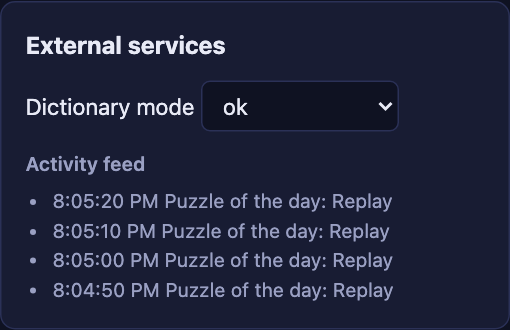
Create the Schedule with a 10-second interval. Every 10 seconds the feed shows Puzzle of the day: ….
-
The Temporal UI’s Schedules page lists
daily-puzzlewith its recent runs. Pause it there, and the announcements stop. Unpause it, and they resume.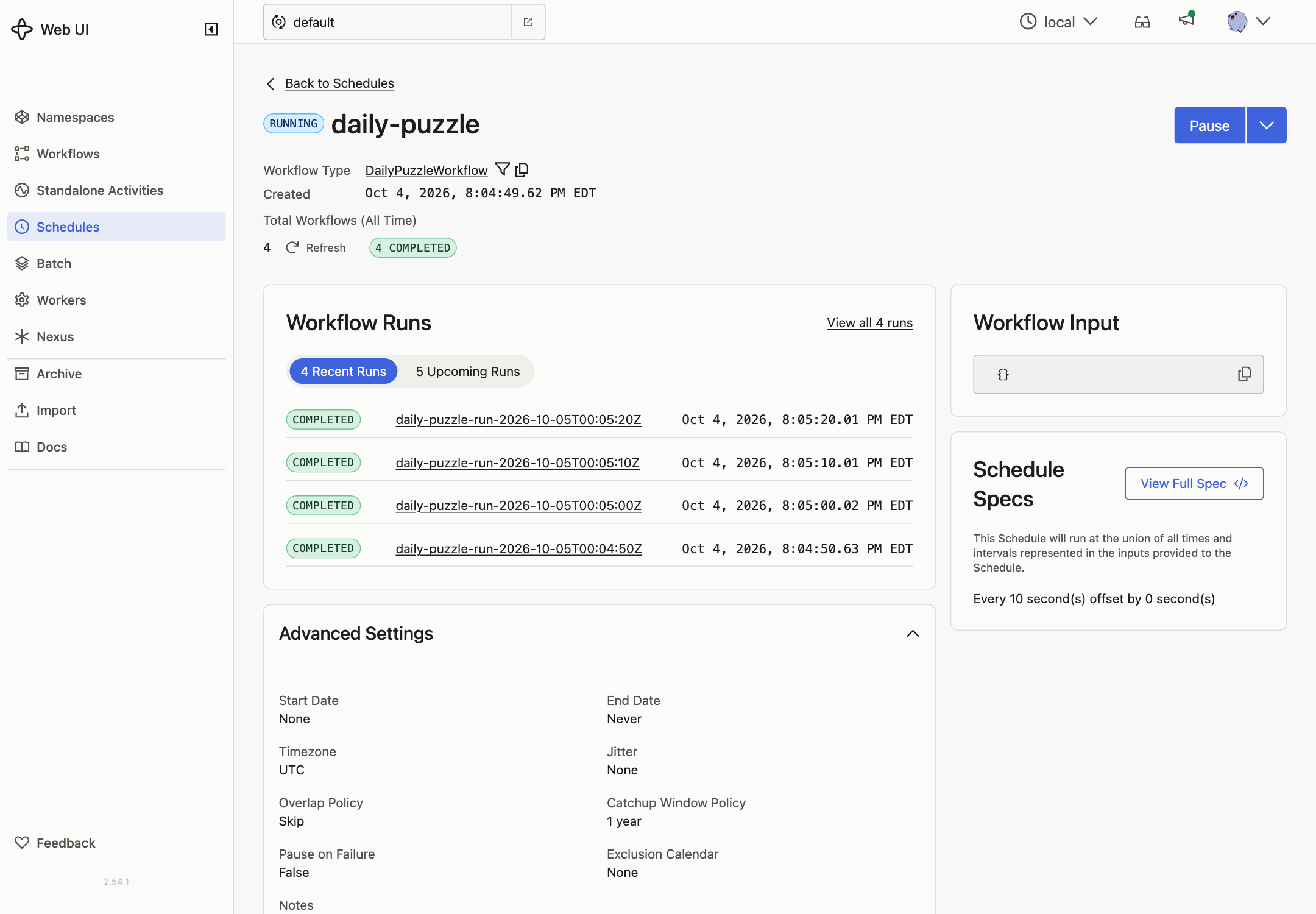
-
Delete the Schedule.
-
Start a single run with a 30-second delay. It appears in the Workflow list right away, but nothing happens until 30 seconds later, when the announcement appears.