Wordflow Temporal Course · Lessons
03 · Signals and Queries
Goal: the game stays open while you play. You send guesses to it and read the board from it.
Concepts
Long-running Workflows. A Workflow can wait for minutes, days, or years. While it waits, it uses no Worker resources. Its state lives in its Event History, and a Worker rebuilds it when there’s something to do.
Signal. A one-way message to a running Workflow. It is recorded in the history (WorkflowExecutionSignaled), so it’s never lost, even if no Worker is running. The sender only learns that Temporal accepted the message. It gets no reply and can’t tell whether the Workflow acted on it.
Query. A read-only request. A Worker runs the Query handler against the Workflow’s current state and returns the answer. Queries aren’t recorded in history, and their handlers must not change state or block.
Message handlers. Register Query handlers before the Workflow’s first blocking call, so the Workflow can answer from the moment it starts. Until the puzzle has loaded, our Query returns a loading view.
What you’ll build
GameWorkflowregisters astateQuery, loads the puzzle, then loops: receive aguessSignal, apply it, until every word is found. It returns the game’s result.StartGamestarts the Workflow and returns the game ID without waiting.GetGamesends thestateQuery.SubmitGuesssends theguessSignal and returns nothing. The API answers202 Accepted, and the web app fetches the board again.
There’s no timer yet, so a game only ends when you find every word.
Build it
1. Message names
In app/shared/shared.go, add:
// Message names for GameWorkflow.
const (
	QueryState  = "state"
	SignalGuess = "guess"
)

type GuessInput struct {
	Word string `json:"word"`
}
Signals and Queries are identified by name, so the API and the Workflow must agree on the strings.
2. A Workflow that waits
Replace GameWorkflow in app/workflows/game.go (keep loadPuzzle):
// GameWorkflow runs one game until every word is found.
func GameWorkflow(ctx workflow.Context, input shared.GameInput) (game.Result, error) {
	gameID := workflow.GetInfo(ctx).WorkflowExecution.ID
	var state *game.State

	err := workflow.SetQueryHandler(ctx, shared.QueryState, func() (game.View, error) {
		if state == nil {
			return game.LoadingView(gameID), nil
		}
		return state.View(), nil
	})
	if err != nil {
		return game.Result{}, err
	}

	puzzle, err := loadPuzzle(ctx, input.PuzzleID)
	if err != nil {
		return game.Result{}, err
	}
	state = game.NewState(gameID, "", puzzle, workflow.Now(ctx))

	guesses := workflow.GetSignalChannel(ctx, shared.SignalGuess)
	for !state.Over() {
		var guess shared.GuessInput
		guesses.Receive(ctx, &guess)
		state.Guess(guess.Word, workflow.Now(ctx))
	}
	return state.Result(), nil
}- The return type is now
game.Result. The Workflow returns it when the game ends. - The Query handler is a closure over
state, so it always sees the latest value. GetSignalChannelreturns a channel of incoming Signals.Receiveblocks until one arrives. Signals that arrive while the Workflow is busy are buffered.- Use
workflow.ChannelandReceive, never Go channels orselect, in Workflow code. The SDK controls how Workflow code is scheduled so that it re-runs the same way every time. state.Guessignores invalid words. Nobody is waiting for its answer.
3. The API
In app/api/api.go, StartGame no longer waits for a result. Replace the end of the method, after the ExecuteWorkflow error check:
return httpapi.StartGameResponse{GameID: run.GetID()}, nilImplement GetGame:
func (a *API) GetGame(ctx context.Context, gameID string) (game.View, error) {
	response, err := a.Temporal.QueryWorkflow(ctx, gameID, "", shared.QueryState)
	if err != nil {
		return game.View{}, err
	}
	var view game.View
	err = response.Get(&view)
	return view, err
}
Implement SubmitGuess:
func (a *API) SubmitGuess(ctx context.Context, req httpapi.GuessRequest) (*game.GuessResult, error) {
	err := a.Temporal.SignalWorkflow(ctx, req.GameID, "", shared.SignalGuess, shared.GuessInput{Word: req.Word})
	return nil, err
}- The empty string is the Run ID. Leaving it empty targets the current run of that Workflow ID.
SignalWorkflowreturns once the Signal is recorded. Anilresult tells the HTTP layer to answer202.
4. Run it
make clean-workflowsRestart the Worker and the server. Compare with solutions/03.
Check it
Before you start, run make clean-workflows to end games from earlier lessons.
-
Click a puzzle. The board appears, sometimes after a brief loading state.
-
Guess a word in the puzzle. Its slot fills in.
-
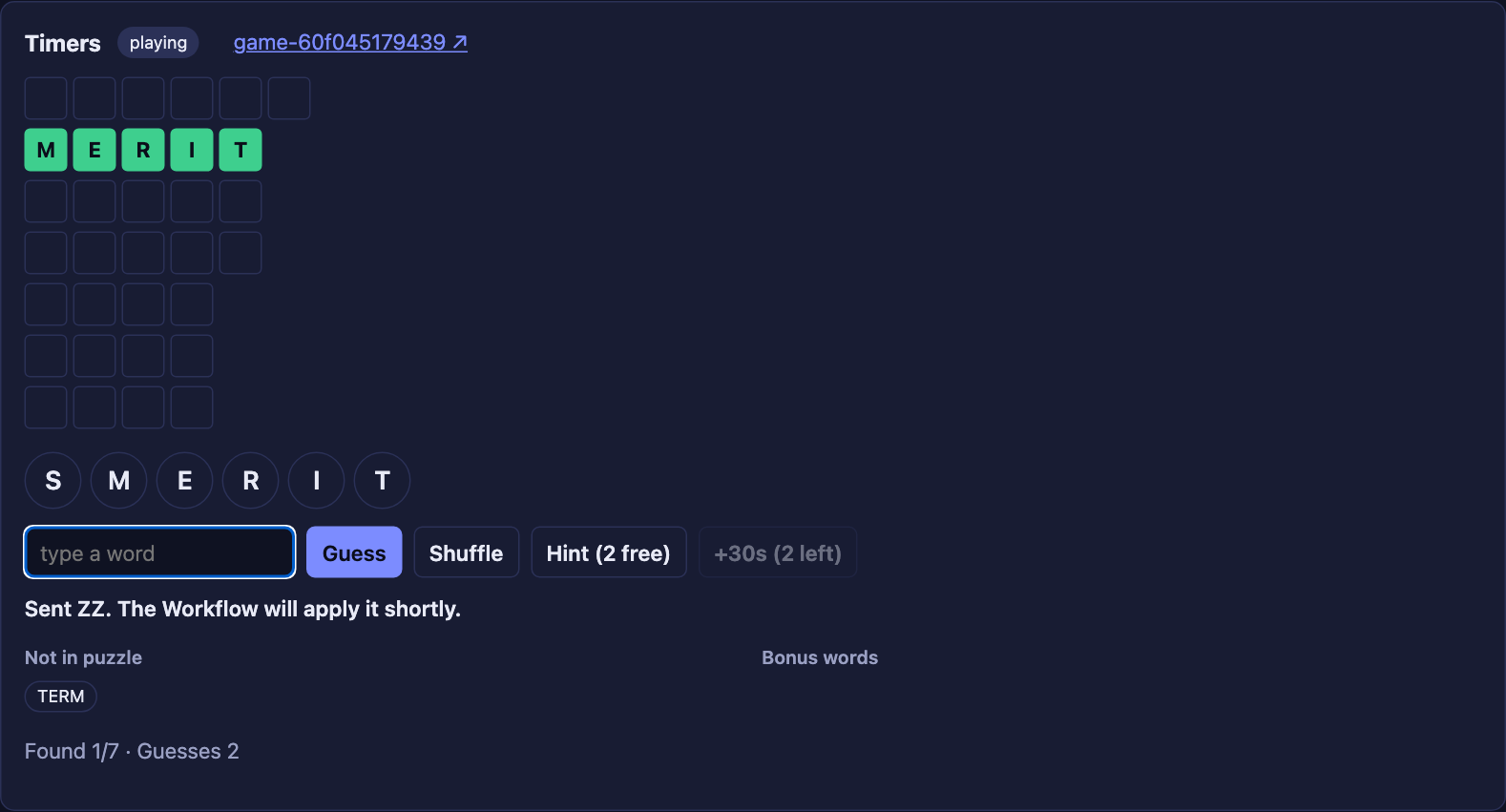
Guess a word made from the letters that isn’t in the puzzle. It appears under Not in puzzle.
-
Guess
zz. The app says Sent ZZ, then nothing changes. The game ignored it, and nobody told you. That’s the downside of Signals. -
In the Temporal UI, every guess is a
WorkflowExecutionSignaledevent. The board refreshes don’t appear anywhere: Queries aren’t recorded.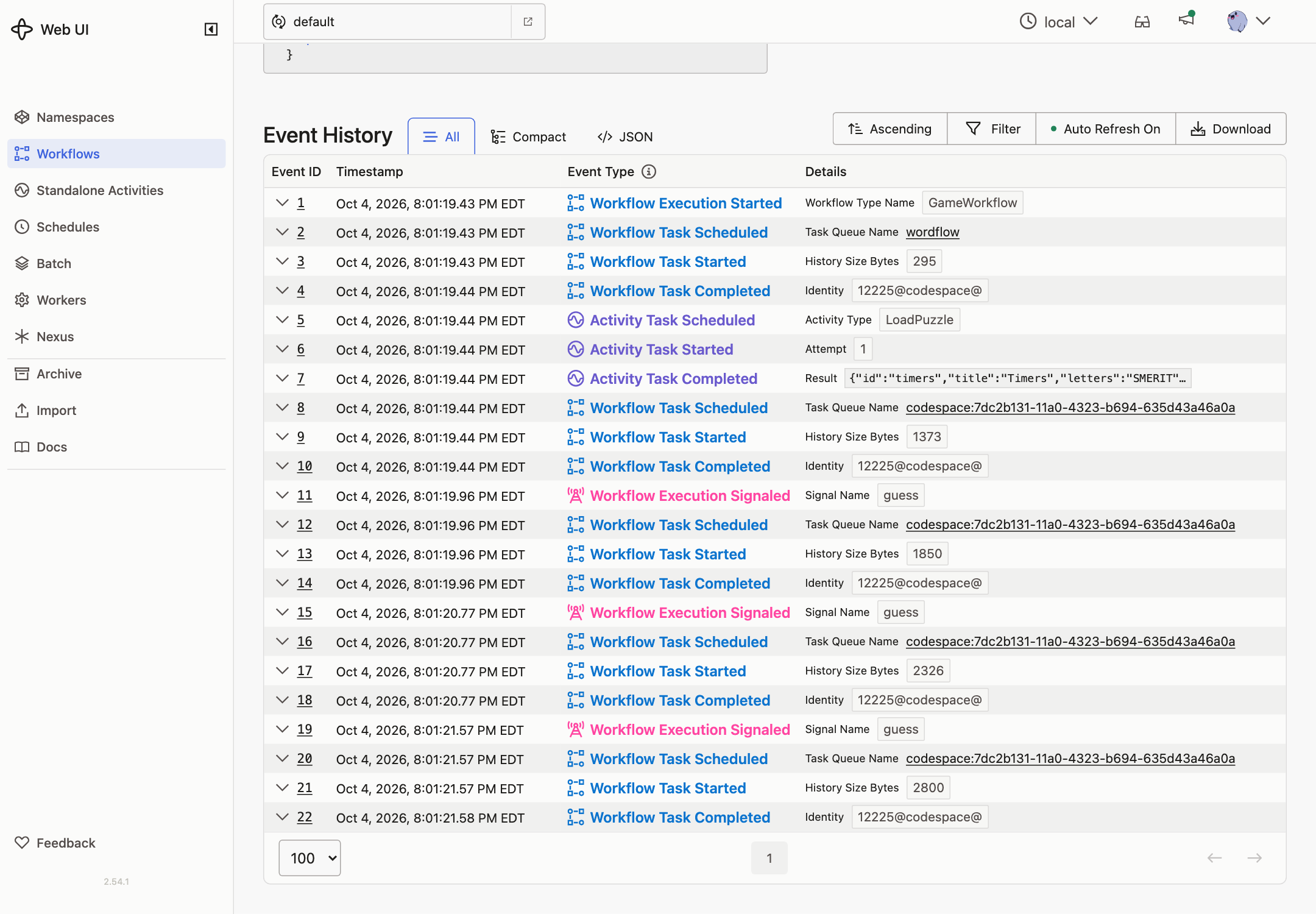
-
Stop the Worker and send two guesses. They’re still accepted, but the board stops refreshing because nothing can answer the Query. Start the Worker. Both guesses are applied.
-
Find every word. The status changes to won, and the Workflow completes with the result (
won,score).
Next, Updates fix the missing feedback: you’ll know right away whether a guess counted.