Wordflow Temporal Course · Lessons
10 · Continue-As-New
Goal: player and leaderboard Workflows can run forever without their histories growing forever.
Concepts
History limits. Every event is stored, and a Worker that loads a Workflow replays all of them. Long histories are slow to replay, and Temporal caps them: it warns at 10,240 events and terminates the Workflow at 51,200 events or 50 MB. An entity that lives forever will get there.
Continue-As-New. Completes the current run and starts a new run with the same Workflow ID, passing whatever state you choose as its input. The new run starts with an empty history. Clients that use the Workflow ID, which ours all do, reach the new run automatically. Each run has its own Run ID.
When to do it. The Temporal Service tells the Workflow when its history is getting long (“continue-as-new suggested”). Here we also continue at 100 events so you can watch it happen. A Workflow can’t read environment variables or files to get a setting like that, so it’s a constant in the code.
Don’t lose work in flight.
- Continue only when idle. A Player with a running child game waits until the game finishes, because the child belongs to this run.
- Wait for running Update handlers to finish first. Otherwise their callers get an error.
- Signals that have arrived but haven’t been read are not carried over. The leaderboard reads every buffered Signal before it continues.
Patterns
What you’ll build
PlayerInputandLeaderboardInputtake an optional state. Each Workflow starts from that state if it’s given.- A shared
shouldContinueAsNewcheck: suggested by the server, or at least 100 events. - The Player waits for “a game started, or time to continue”. If it’s time and no game is running, it waits for handlers to finish, checks again, and continues as new with its state.
- The leaderboard checks after each Signal, drains buffered Signals, and continues as new with its board.
Build it
1. Carry state in the input
In app/shared/shared.go, add import "wordflow/internal/game" back, then:
type LeaderboardInput struct {
	State *game.Leaderboard `json:"state,omitempty"`
}

type PlayerInput struct {
	Name string `json:"name"`
	// State is set when the Workflow continues as new.
	State *game.Player `json:"state,omitempty"`
}
The game types are plain structs with exported, JSON-tagged fields, so they serialize as Workflow input.
2. The Player
In app/workflows/player.go, add near the top:
// historyLimit is low so you can watch Continue-As-New happen. Real code can
// rely on GetContinueAsNewSuggested alone.
const historyLimit = 100
Start from the input state if there is one:
	player := input.State
	if player == nil {
		player = game.NewPlayer(input.Name, workflow.Now(ctx))
	}
Replace the start of the main loop, up to var result game.Result:
	for {
		err := workflow.Await(ctx, func() bool { return activeGame != nil || shouldContinueAsNew(ctx) })
		if err != nil {
			return err
		}
		if activeGame == nil {
			// Let running handlers finish. One of them may start a game.
			if err := workflow.Await(ctx, func() bool { return workflow.AllHandlersFinished(ctx) }); err != nil {
				return err
			}
			if activeGame == nil {
				return workflow.NewContinueAsNewError(ctx, PlayerWorkflow, shared.PlayerInput{Name: player.Name, State: player})
			}
		}

		var result game.Result
		// ... unchanged
Add the check:
func shouldContinueAsNew(ctx workflow.Context) bool {
	info := workflow.GetInfo(ctx)
	return info.GetContinueAsNewSuggested() || info.GetCurrentHistoryLength() >= historyLimit
}- Continue-As-New is an error you return.
NewContinueAsNewErrortakes the Workflow function and its new input. GetCurrentHistoryLengthis the event count, and it’s deterministic.- After waiting for handlers, check
activeGameagain: astartGamemight have just finished.
3. The leaderboard
In app/workflows/leaderboard.go, start from the input state:
	board := input.State
	if board == nil {
		board = &game.Leaderboard{}
	}
At the end of the loop, after board.Upsert(entry):
		if shouldContinueAsNew(ctx) {
			// Apply Signals that already arrived. They do not carry over to the new run.
			for {
				var pending game.LeaderboardEntry
				if !scores.ReceiveAsync(&pending) {
					break
				}
				board.Upsert(pending)
			}
			return workflow.NewContinueAsNewError(ctx, LeaderboardWorkflow, shared.LeaderboardInput{State: board})
		}
ReceiveAsync returns false right away when the channel is empty.
4. Run it
make clean-workflowsRestart the Worker. The API didn’t change. Compare with solutions/10.
Check it
Run make clean-workflows, restart the Worker and the server, and join as alice.
-
Play about five short games. Using two free hints and then letting the clock run out is quick. Watch
player-alicein the Temporal UI: when her history passes 100 events, the run ends as Continued as New.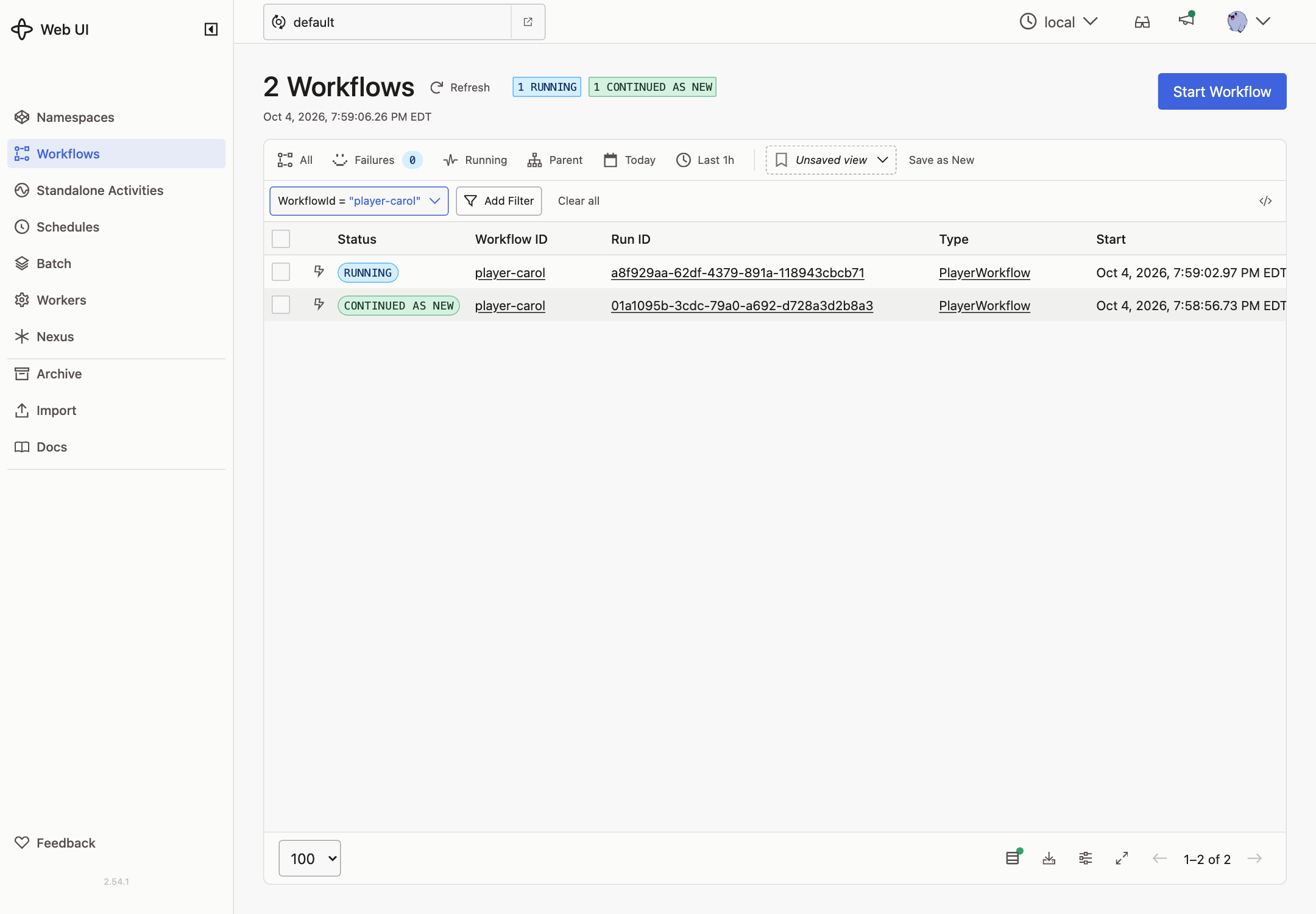
-
The Workflow page now shows the new run. Its input contains her full state: points, games played, and so on.
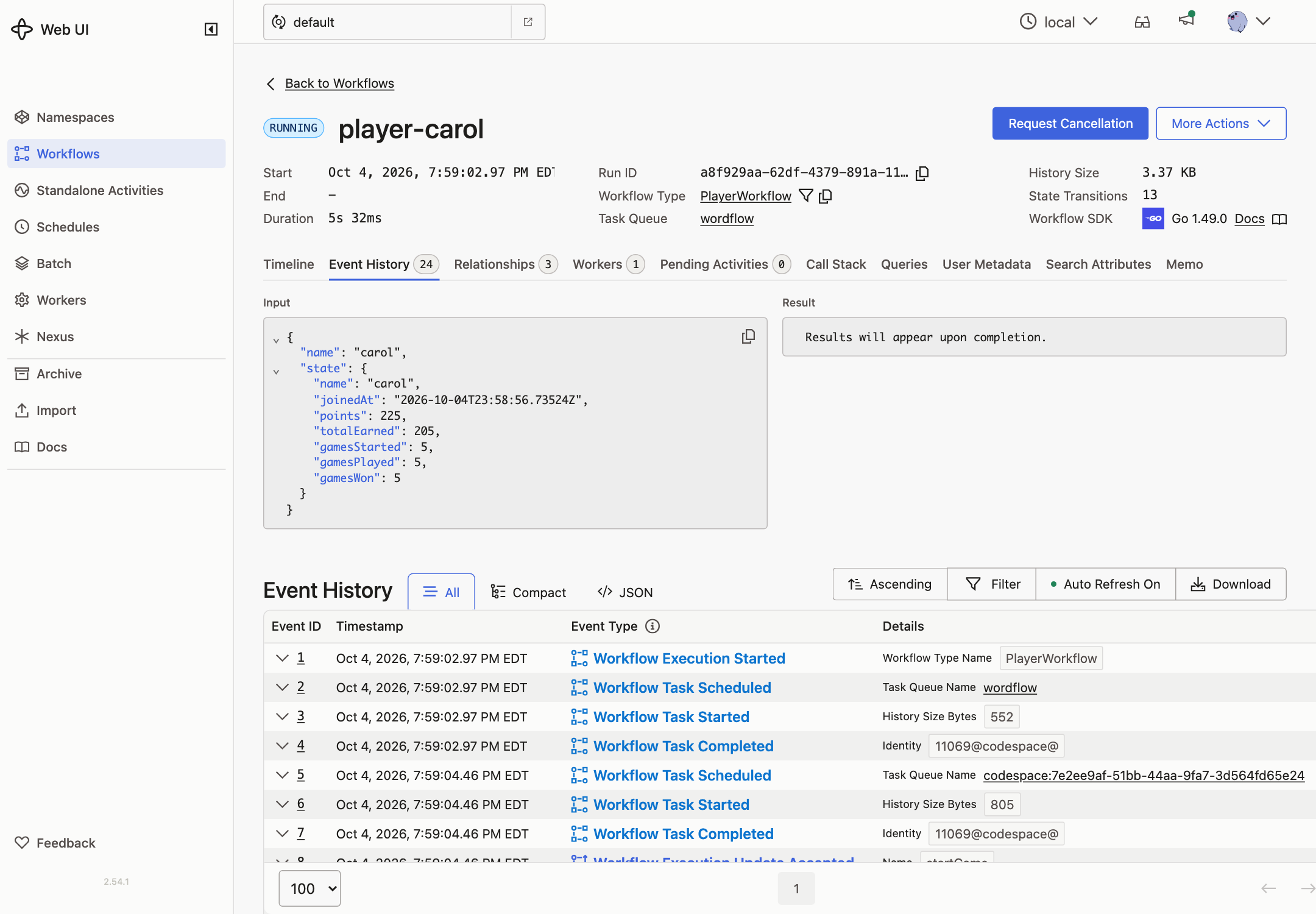
-
The player panel shows the same numbers as before, and new games and hints still work. The API didn’t change.
-
To see it sooner, lower the limit to 40 and restart the Worker.