Wordflow Temporal Course · Lessons
07 · Child Workflows
Goal: a player’s games belong to them. Finishing a game adds its score to the player’s points and stats.
Concepts
Child Workflow. A Workflow started by another Workflow. It has its own ID, Event History, and result. The parent can wait for it to start, wait for it to finish, or both. Children keep each history small and focused. The player’s history records “game 3 started” and “game 3 finished with this result”, not every guess.
Parent close policy. What happens to a running child when its parent closes. The default terminate ends the child too. Other options are abandon (the child keeps running) and request cancel.
Handlers run concurrently. When a handler blocks, other handlers and the main loop can run. Change state before blocking, so the next message sees it. startGame marks the player as busy before it waits for the child to start. Without that, a second startGame could pass the validator while the first one waits.
Deterministic IDs. The game ID comes from the player’s state (game-alice-3), so it’s the same every time the code re-runs.
Patterns
What you’ll build
GameWorkflowtakes an optional player ID.- A
startGameUpdate onPlayerWorkflow. The validator allows one game at a time. The handler marks the player as busy, starts a childGameWorkflow, waits for it to start, and returns the game ID. - The Player main loop waits for an active game, waits for its result, and records it.
StartGamein the API: for a player, sendstartGameto the player, thenreadyto the new game. Guests use the Lesson 4 path.
Build it
1. Names and types
In app/shared/shared.go, add UpdateStartGame = "startGame" to the Player message names, and:
type StartGameInput struct {
	PuzzleID string `json:"puzzleId"`
}

type StartGameResult struct {
	GameID string `json:"gameId"`
}
Add a player ID to GameInput:
type GameInput struct {
	PuzzleID string `json:"puzzleId"`
	PlayerID string `json:"playerId,omitempty"`
}
2. Games know their player
In GameWorkflow, pass the player ID to NewState:
state = game.NewState(gameID, input.PlayerID, puzzle, now)3. Start a child from an Update
In app/workflows/player.go, declare the active game after player:
var activeGame workflow.ChildWorkflowFutureThen register startGame after the join handler:
	err = workflow.SetUpdateHandlerWithOptions(ctx, shared.UpdateStartGame,
		func(ctx workflow.Context, input shared.StartGameInput) (shared.StartGameResult, error) {
			// Change state before blocking, so a second startGame sees this game.
			gameID := player.NextGameID()
			player.StartGame(gameID)

			childCtx := workflow.WithChildOptions(ctx, workflow.ChildWorkflowOptions{WorkflowID: gameID})
			future := workflow.ExecuteChildWorkflow(childCtx, GameWorkflow, shared.GameInput{
				PuzzleID: input.PuzzleID,
				PlayerID: player.Name,
			})
			// Wait until the child has started, not until it finishes.
			if err := future.GetChildWorkflowExecution().Get(ctx, nil); err != nil {
				player.ClearGame(gameID)
				return shared.StartGameResult{}, err
			}
			activeGame = future
			return shared.StartGameResult{GameID: gameID}, nil
		},
		workflow.UpdateHandlerOptions{
			Validator: func(ctx workflow.Context, input shared.StartGameInput) error {
				return player.CheckStartGame()
			},
		},
	)
	if err != nil {
		return err
}- Children run on the parent’s Task Queue unless you set one.
ExecuteChildWorkflowreturns aChildWorkflowFuture.GetChildWorkflowExecution()resolves when the child starts.Getresolves when it finishes.- If the child can’t start, for example because its ID is already in use, the handler undoes
StartGameand returns the error.
4. Wait for each game
Replace the return workflow.Await(ctx, func() bool { return false }) line with:
	for {
		if err := workflow.Await(ctx, func() bool { return activeGame != nil }); err != nil {
			return err
		}
		var result game.Result
		if err := activeGame.Get(ctx, &result); err != nil {
			workflow.GetLogger(ctx).Error("game failed", "gameID", player.ActiveGameID, "error", err)
			player.ClearGame(player.ActiveGameID)
		} else {
			player.FinishGame(result)
		}
		activeGame = nil
	}
workflow.GetLogger doesn’t log again when code re-runs.
5. The API
In app/api/api.go, rename the current StartGame to startGuestGame, then add a new StartGame above it:
func (a *API) StartGame(ctx context.Context, req httpapi.StartGameRequest) (httpapi.StartGameResponse, error) {
	if req.Player == "" {
		return a.startGuestGame(ctx, req)
	}

	handle, err := a.Temporal.UpdateWorkflow(ctx, client.UpdateWorkflowOptions{
		WorkflowID:   shared.PlayerWorkflowID(req.Player),
		UpdateID:     req.RequestID,
		UpdateName:   shared.UpdateStartGame,
		Args:         []any{shared.StartGameInput{PuzzleID: req.PuzzleID}},
		WaitForStage: client.WorkflowUpdateStageCompleted,
	})
	if err != nil {
		return httpapi.StartGameResponse{}, err
	}
	var started shared.StartGameResult
	if err := handle.Get(ctx, &started); err != nil {
		return httpapi.StartGameResponse{}, err
	}

	ready, err := a.Temporal.UpdateWorkflow(ctx, client.UpdateWorkflowOptions{
		WorkflowID:   started.GameID,
		UpdateName:   shared.UpdateReady,
		WaitForStage: client.WorkflowUpdateStageCompleted,
	})
	if err != nil {
		return httpapi.StartGameResponse{}, err
	}
	var view game.View
	if err := ready.Get(ctx, &view); err != nil {
		return httpapi.StartGameResponse{}, err
	}
	return httpapi.StartGameResponse{GameID: started.GameID, Game: &view}, nil
}

func (a *API) startGuestGame(ctx context.Context, req httpapi.StartGameRequest) (httpapi.StartGameResponse, error) {
	// ... the Lesson 4 code, unchanged
}
The request ID is the startGame Update ID. A retried request returns the same game instead of failing with “finish your current game first”.
6. Run it
make clean-workflowsRestart the Worker and the server. Compare with solutions/07.
Check it
Run make clean-workflows, then restart the Worker and the server. Join again, because the old player Workflows are gone.
-
Join as
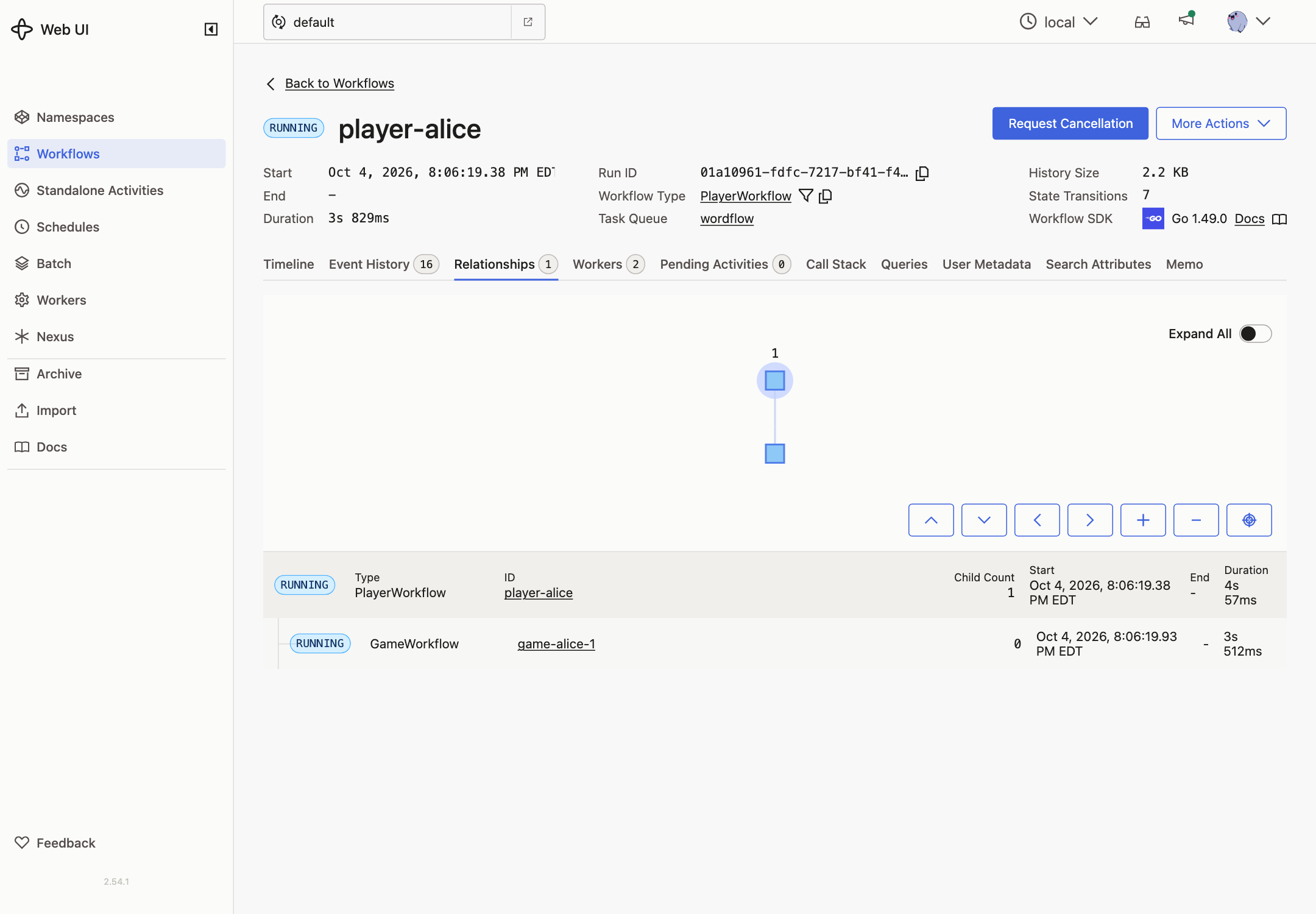
aliceand start a game. In the Temporal UI,player-aliceshowsStartChildWorkflowExecutionInitiatedandChildWorkflowExecutionStarted. The game’s ID isgame-alice-1, and its page links to its parent.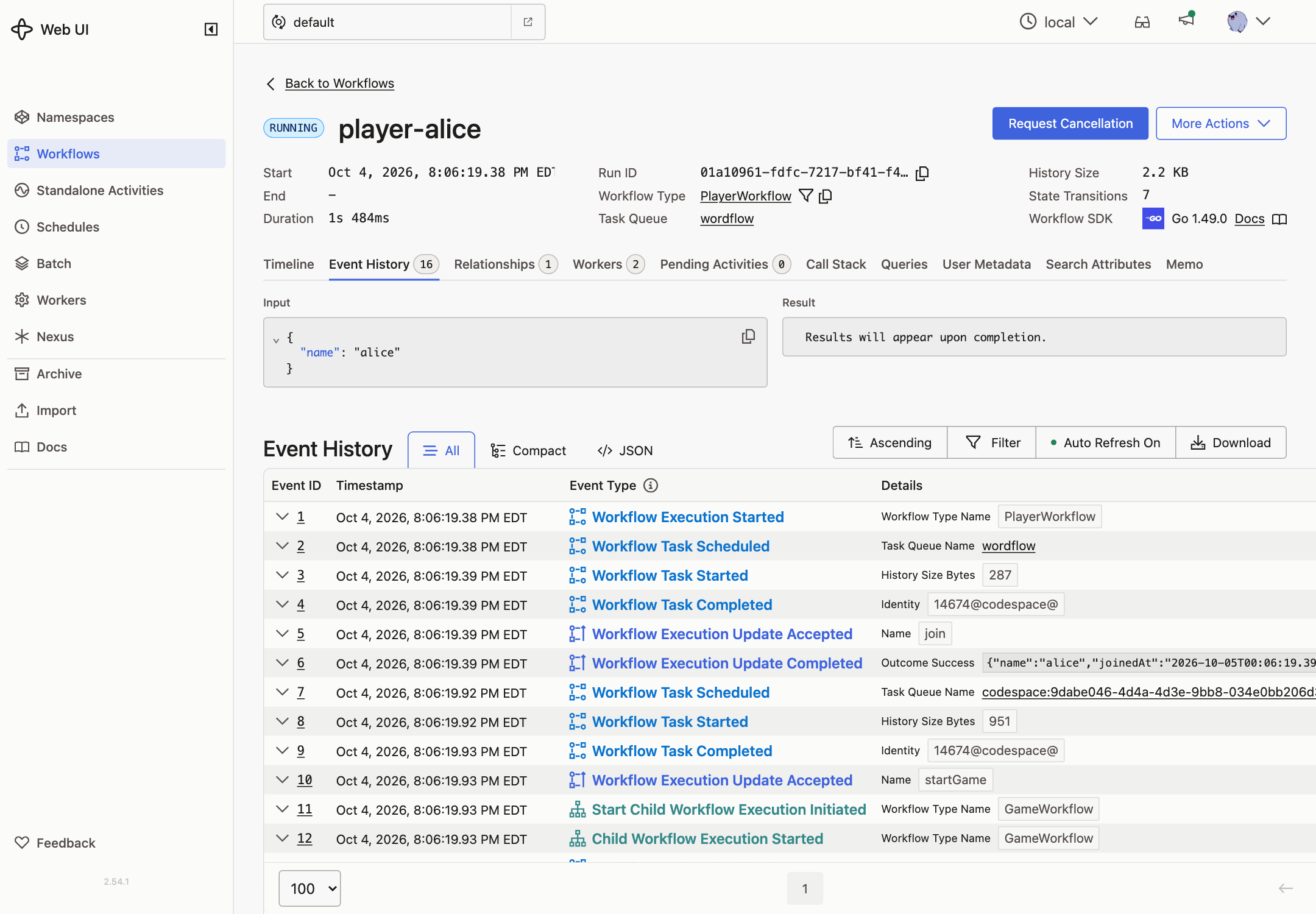
The Relationships tab shows the parent and its child.
-
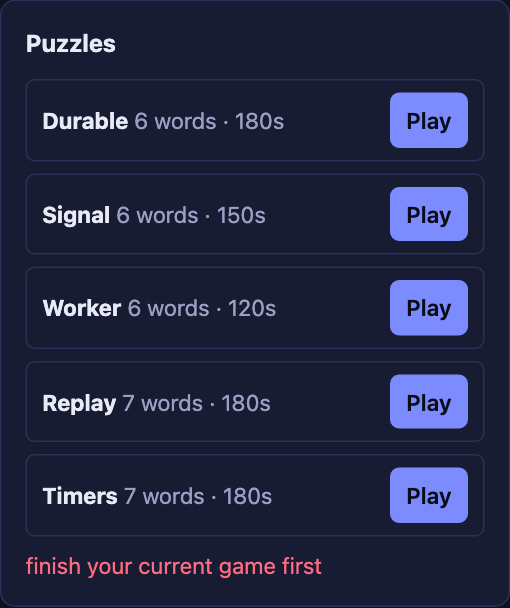
Click another puzzle while playing. You get finish your current game first, and nothing is added to her history.
-
Finish the game, or let it time out. The player panel updates: games played, and points increased by the score.
player-aliceshowsChildWorkflowExecutionCompletedwith the result.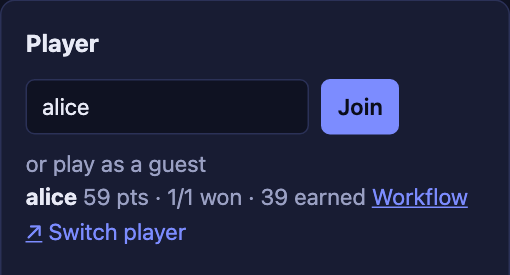
-
Start another game, then terminate
player-alicefrom the Temporal UI. Her game is terminated too: that’s the parent close policy. -
Click Switch player and start a game without joining. Guest games still work.