Wordflow Temporal Course · Lessons
06 · Entity Workflows
Goal: players can join. Each player is a Workflow that holds their points and stats.
Concepts
Entity Workflow. A Workflow that represents one thing, here a player, for as long as it exists. It keeps the entity’s state in memory and changes it through messages. The Workflow ID is the entity’s key: player-alice. There’s no database: the Event History is the record.
Only one at a time. Temporal allows one running Workflow per ID. Two requests to create player-alice can’t produce two players.
ID conflict policy. What happens when you start a Workflow whose ID is already running. The default fail returns an “already started” error. Use existing returns the running Workflow instead.
ID reuse policy. What happens when you start a Workflow whose ID belongs to a closed Workflow. The default allows it, which creates a new run with a fresh history.
Join is idempotent. Update-with-Start with use existing: the first join creates the player, and every later join just returns the player’s view. The API doesn’t need to check whether the player exists first.
Patterns
What you’ll build
PlayerWorkflow: creates the player, registers aplayerQuery and ajoinUpdate that returns the player’s view, and then waits forever.JoinPlayer: Update-with-Start onplayer-<name>, with Updatejoin.GetPlayer: theplayerQuery.
Games are still guest games. Lesson 7 connects them to players.
Build it
1. Names
In app/shared/shared.go, add:
// Message names for PlayerWorkflow.
const (
	QueryPlayer = "player"
	UpdateJoin  = "join"
)

// PlayerWorkflowID is the one Workflow ID for a player.
func PlayerWorkflowID(name string) string {
	return "player-" + name
}

type PlayerInput struct {
	Name string `json:"name"`
}
2. The Player Workflow
Create app/workflows/player.go:
package workflows

import (
	"go.temporal.io/sdk/workflow"

	"wordflow/app/shared"
	"wordflow/internal/game"
)

// PlayerWorkflow is one player for as long as they play.
func PlayerWorkflow(ctx workflow.Context, input shared.PlayerInput) error {
	player := game.NewPlayer(input.Name, workflow.Now(ctx))

	err := workflow.SetQueryHandler(ctx, shared.QueryPlayer, func() (game.PlayerView, error) {
		return player.View(), nil
	})
	if err != nil {
		return err
	}

	err = workflow.SetUpdateHandler(ctx, shared.UpdateJoin, func(ctx workflow.Context) (game.PlayerView, error) {
		return player.View(), nil
	})
	if err != nil {
		return err
	}

	// The Workflow stays open, holding the player's state, until something
	// ends it. Lesson 10 adds Continue-As-New to keep its history small.
	return workflow.Await(ctx, func() bool { return false })
}
join doesn’t change anything. Its job is to give Update-with-Start something to send, so the caller gets the player’s view back.
Register it in app/cmd/worker/main.go:
w.RegisterWorkflow(workflows.PlayerWorkflow)3. The API
The HTTP layer has already checked and normalized the name. In app/api/api.go:
func (a *API) JoinPlayer(ctx context.Context, name string) (game.PlayerView, error) {
	startOp := a.Temporal.NewWithStartWorkflowOperation(client.StartWorkflowOptions{
		ID:                       shared.PlayerWorkflowID(name),
		TaskQueue:                shared.TaskQueue,
		WorkflowIDConflictPolicy: enumspb.WORKFLOW_ID_CONFLICT_POLICY_USE_EXISTING,
	}, workflows.PlayerWorkflow, shared.PlayerInput{Name: name})

	handle, err := a.Temporal.UpdateWithStartWorkflow(ctx, client.UpdateWithStartWorkflowOptions{
		StartWorkflowOperation: startOp,
		UpdateOptions: client.UpdateWorkflowOptions{
			UpdateName:   shared.UpdateJoin,
			WaitForStage: client.WorkflowUpdateStageCompleted,
		},
	})
	if err != nil {
		return game.PlayerView{}, err
	}
	var view game.PlayerView
	err = handle.Get(ctx, &view)
	return view, err
}

func (a *API) GetPlayer(ctx context.Context, name string) (game.PlayerView, error) {
	response, err := a.Temporal.QueryWorkflow(ctx, shared.PlayerWorkflowID(name), "", shared.QueryPlayer)
	if err != nil {
		return game.PlayerView{}, err
	}
	var view game.PlayerView
	err = response.Get(&view)
	return view, err
}
Querying a Workflow ID that doesn’t exist returns a *serviceerror.NotFound, which the HTTP layer maps to 404.
4. Run it
Restart the Worker and the server. Compare with solutions/06.
Check it
-
Join as
alice. The player panel shows 20 points. In the Temporal UI,player-aliceis Running.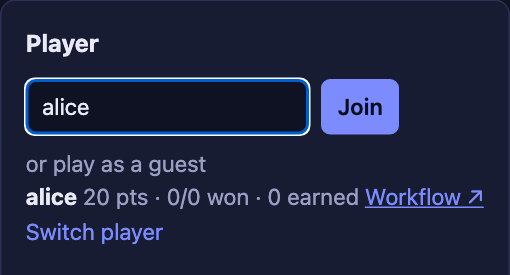
-
Click Switch player and join as
aliceagain. The history has a secondjoinUpdate, and there’s still one Workflow. Both Updates return the samejoinedAt.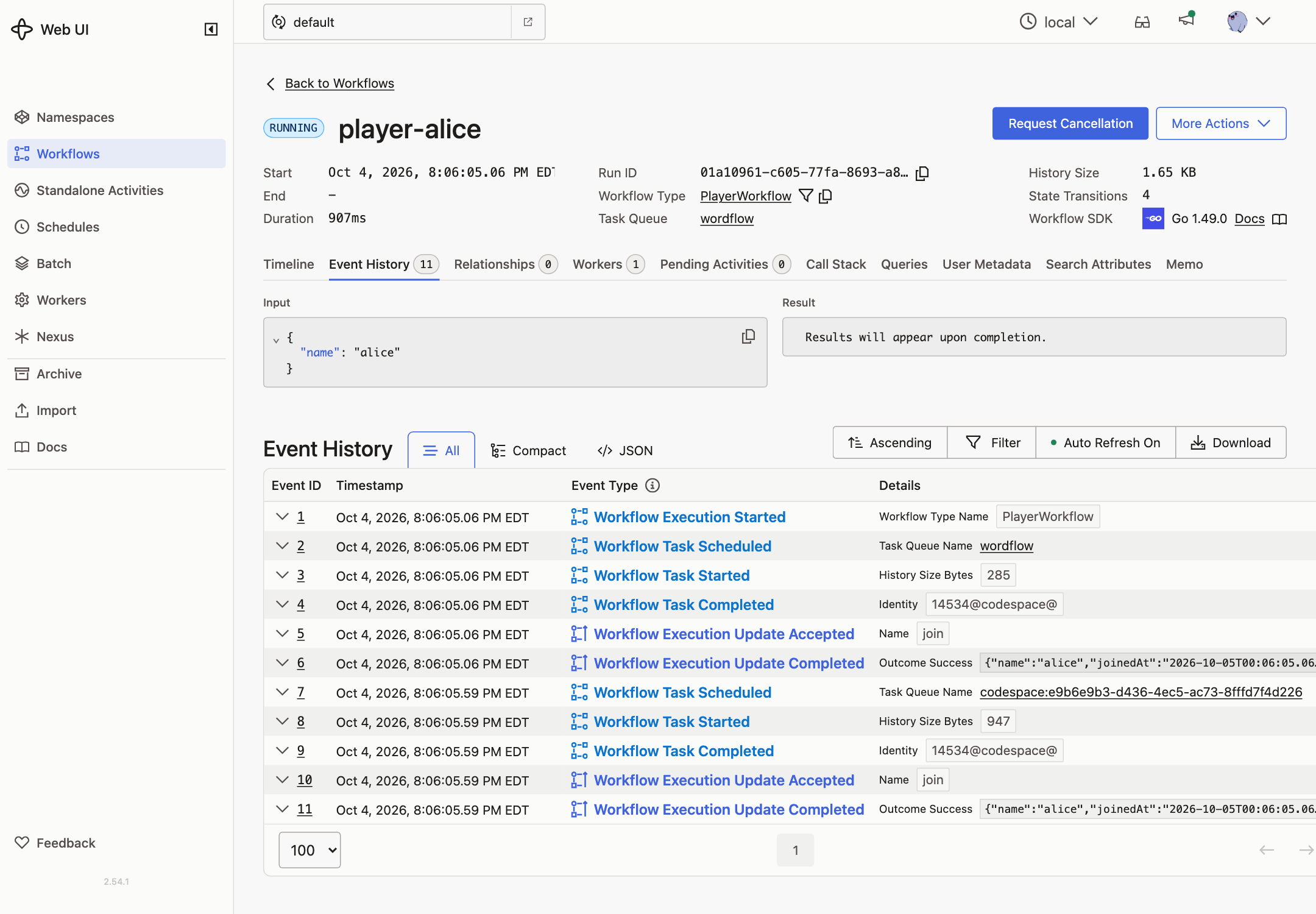
-
Reload the page. You’re still
alice: the app queries the player. -
curl -i localhost:8080/api/players/nobodyreturns404. -
Play a game. Alice’s points don’t change yet.