Wordflow Temporal Course · Lessons
12 · Determinism and replay
Goal: understand exactly why changing Workflow code can break running Workflows, and catch it before you deploy.
Concepts
Replay. When a Worker needs a Workflow’s state, it runs the Workflow code from the start and feeds it the recorded events. Activity results, Timer firings, and messages all come from history instead of happening again. A Worker that restarts, or one that loads a Workflow it hasn’t cached, replays.
Commands must match events. As the code runs, it produces commands: “schedule this Activity”, “start this Timer”. During replay, each command must match the next recorded event. If the code now schedules an Activity where the history has a Timer, the Worker can’t continue safely. That’s a nondeterminism error (TMPRL1100).
What happens then. The Workflow doesn’t fail. Its Workflow Task fails and is retried until a Worker with compatible code picks it up. Fix the code, or roll back the deploy, and it continues.
What breaks replay:
- Adding, removing, or reordering Activities, Timers, Child Workflows, or anything else that produces a command, in code that existing Workflows have already passed.
- Reading the clock, random numbers, environment variables, or global state directly.
- Ranging over maps, or using native threads, goroutines, or channels in Workflow code.
What’s safe: changing Activity code, changing code that runs only after every existing Workflow has passed that point, and changing the logic inside a handler, as long as it produces the same commands.
Replay testing. Save real histories. Before deploying, replay them against the new code. A failure means the deploy would break running Workflows.
What you’ll build
- A
FeedActivities.AnnounceActivity that posts to the feed service, and anannouncehelper that never fails the game. The helper isn’t called yet. - A replay command that loads saved histories and replays them against your Workflow code.
- Then you’ll break it on purpose.
Build it
1. The feed Activity
Create app/activities/feed.go:
package activities

import (
	"bytes"
	"context"
	"encoding/json"
	"fmt"
	"net/http"
)

// FeedActivities post messages to the activity feed service.
type FeedActivities struct {
	BaseURL string
	HTTP    *http.Client
}

func (a *FeedActivities) Announce(ctx context.Context, message string) error {
	body, err := json.Marshal(map[string]string{"message": message})
	if err != nil {
		return err
	}
	req, err := http.NewRequestWithContext(ctx, http.MethodPost, a.BaseURL, bytes.NewReader(body))
	if err != nil {
		return err
	}
	req.Header.Set("Content-Type", "application/json")
	resp, err := a.HTTP.Do(req)
	if err != nil {
		return err
	}
	defer resp.Body.Close()
	if resp.StatusCode >= 300 {
		return fmt.Errorf("feed returned %d", resp.StatusCode)
	}
	return nil
}
Register it in the Worker:
w.RegisterActivity(&activities.FeedActivities{BaseURL: servicesURL + "/feed", HTTP: http.DefaultClient})Add these helpers to app/workflows/game.go, but don’t call them yet:
// announce posts to the activity feed. A feed outage must not stop the game.
func announce(ctx workflow.Context, message string) {
	ctx = workflow.WithActivityOptions(ctx, workflow.ActivityOptions{
		StartToCloseTimeout:    2 * time.Second,
		ScheduleToCloseTimeout: 5 * time.Second,
	})
	var a *activities.FeedActivities
	if err := workflow.ExecuteActivity(ctx, a.Announce, message).Get(ctx, nil); err != nil {
		workflow.GetLogger(ctx).Warn("announce failed", "error", err)
	}
}

func startedMessage(state *game.State) string {
	who := "A guest"
	if state.PlayerID != "" {
		who = state.PlayerID
	}
	return who + " started " + state.Puzzle.Title
}
Run make clean-workflows and restart the Worker. You haven’t changed any Workflow’s commands, but the old Workflows aren’t needed for this lesson.
2. The replayer
Create app/cmd/replay/main.go:
// Command replay checks saved Workflow histories against the current Workflow code.
//
//	go run ./app/cmd/replay histories/*.json
package main

import (
	"fmt"
	"log/slog"
	"os"

	"go.temporal.io/sdk/log"
	"go.temporal.io/sdk/worker"

	"wordflow/app/workflows"
)

func main() {
	replayer := worker.NewWorkflowReplayer()
	replayer.RegisterWorkflow(workflows.GameWorkflow)
	replayer.RegisterWorkflow(workflows.PlayerWorkflow)
	replayer.RegisterWorkflow(workflows.LeaderboardWorkflow)

	// The error returned below says everything we need, so discard the SDK's logs.
	quiet := log.NewStructuredLogger(slog.New(slog.DiscardHandler))

	failed := false
	for _, path := range os.Args[1:] {
		if err := replayer.ReplayWorkflowHistoryFromJSONFile(quiet, path); err != nil {
			fmt.Printf("FAIL %s\n     %v\n", path, err)
			failed = true
			continue
		}
		fmt.Printf("ok   %s\n", path)
	}
	if failed {
		os.Exit(1)
	}
}
The replayer runs your Workflow code against a history without connecting to Temporal. Activities aren’t registered, because their results come from the history. In a real project, run this in CI with histories from production.
3. Save histories and replay
Join as alice, finish one game, and start a second one. Leave the second game running. Then:
make history ID=game-alice-1
make history ID=game-alice-2
make history ID=player-alice
make replay
make history runs temporal workflow show --output json and saves the result in histories/. You should see ok three times.
4. Break it
In GameWorkflow, call announce right after the state is created:
	state = game.NewState(gameID, input.PlayerID, puzzle, now)
	announce(ctx, startedMessage(state))
	state.SetDeadline(now.Add(puzzle.TimeLimit()))
Run make replay. Both games fail:
FAIL histories/game-alice-1.json
     [TMPRL1100] ... a matching Timer command was expected ...
The history says the next command after loading the puzzle was a Timer. The new code produced an Activity.
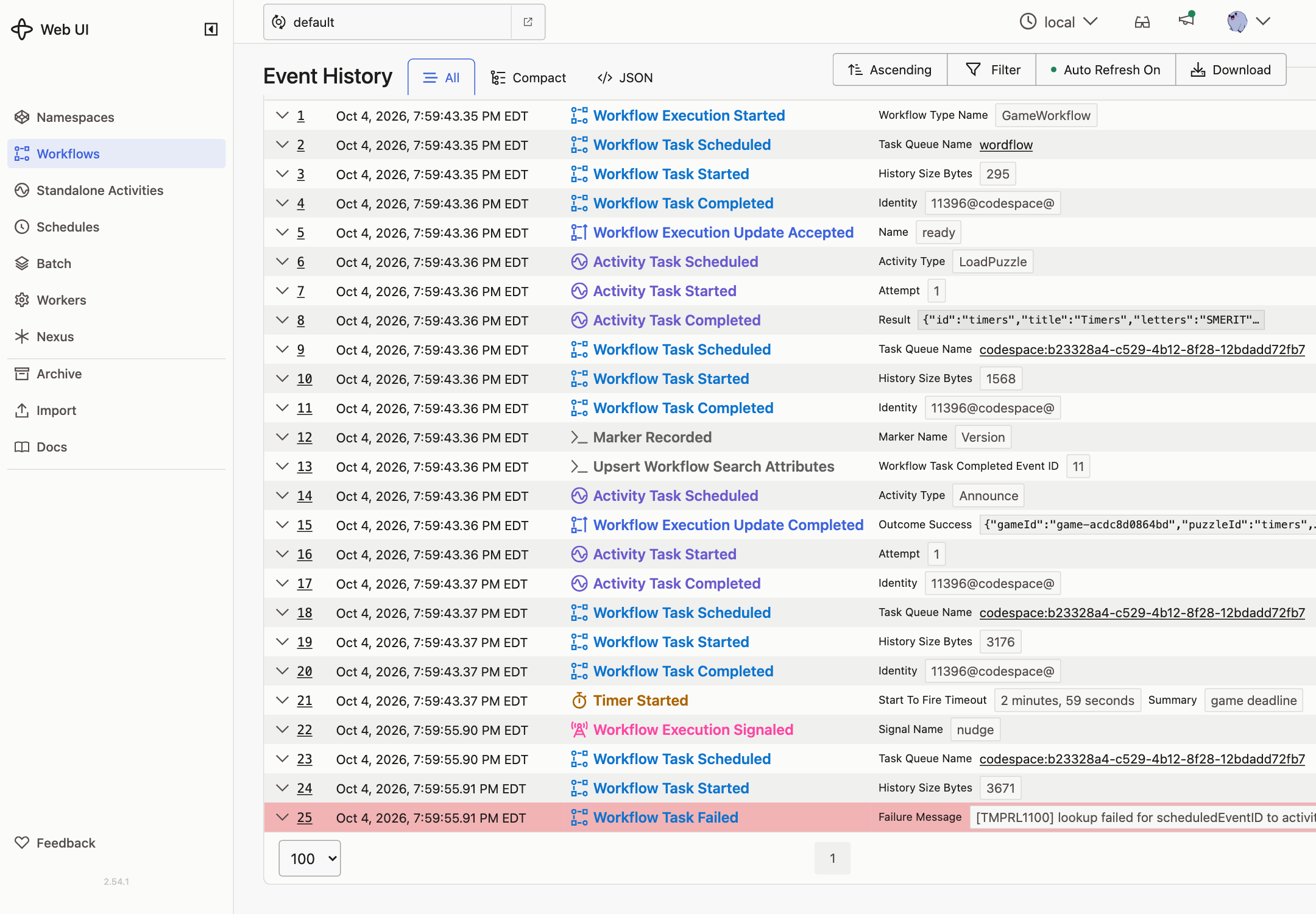
Now restart the Worker with this code and guess a word in game-alice-2. The Worker replays the game, hits the same mismatch, and the guess times out. The Temporal UI shows WorkflowTaskFailed with the same error.
5. Undo it
Remove the announce line and restart the Worker. Within about 10 seconds the next Workflow Task attempt succeeds, and game-alice-2 carries on. If its clock ran out while it was stuck, it ends as timed out.
6. Static checks
The Go SDK has a linter that flags non-deterministic calls, such as time.Now, rand, map iteration, and goroutines, in Workflow code:
go run go.temporal.io/sdk/contrib/tools/workflowcheck@latest ./app/...No output means no problems found. It can’t catch command order changes like the one above. Only replay tests catch those.
Compare with solutions/12.
Check it
-
Play one game to the end and start another. Save their histories, and the player’s, with
make history ID=....make replayprintsokfor each. -
Add a call to
announceright after the game state is created.make replayprintsFAILfor every game, with aTMPRL1100error. The new code schedules an Activity where the history has a Timer. -
Start a game on the old code, then restart the Worker with the new code and make a guess. The guess times out. In the Temporal UI, the game shows a failed Workflow Task with the nondeterminism error, retrying.
-
Remove the call and restart the Worker. The stuck game picks up where it left off.
Lesson 13 ships the same change safely.