Wordflow Temporal Course · Lessons
01 · Your first Workflow
Goal: clicking a puzzle starts a Workflow that creates a new game and returns the board.
Concepts
Workflow. A function whose progress Temporal records. Each step it takes is saved as an event in its Event History. If the Worker running it crashes, another Worker rebuilds its state by re-running the code against that history. This is what makes a Workflow durable.
Determinism. Because Workflow code is re-run, it must make the same decisions every time. It can’t read the system clock, generate random numbers, or call the network directly. Use the SDK’s clock (workflow.Now and its equivalents), which returns the time recorded in history. That’s why the game rules take now as an argument.
Worker. Your process. It connects to the Temporal Service, polls a Task Queue, and runs the Workflows registered with it. Ours polls wordflow.
Temporal Client. How the API talks to Temporal. Execute Workflow starts a Workflow and returns a handle. Calling get result on the handle waits for the Workflow to finish.
Workflow ID. Your name for a Workflow. Only one Workflow with a given ID can run at a time. The web app sends an Idempotency-Key with each request, and the API uses it as the Workflow ID (game-<key>). If a request is retried, it can’t start a second game.
What you’ll build
- Shared names: the Task Queue and the Workflow’s input type.
GameWorkflow: takes a puzzle, creates the game state, returns its view.- The Worker: connect, register
GameWorkflow, run. StartGamein the API: read the puzzle file, startGameWorkflowwith it, wait for the result.
For now the API reads the puzzle and passes it in. Lesson 2 moves that into the Workflow.
Build it
1. Shared names
The API, the Worker, and the Workflows all need the Task Queue name and the Workflow’s input type. Create app/shared/shared.go:
// Package shared holds names and types used by Workflows, Activities, and the API.
package shared

import "wordflow/internal/game"

// TaskQueue is where the API sends work and where the Worker picks it up.
const TaskQueue = "wordflow"

type GameInput struct {
	Puzzle game.Puzzle `json:"puzzle"`
}

// GuestGameID derives a Workflow ID from the HTTP request ID, so a retried
// request maps to the same Workflow.
func GuestGameID(requestID string) string {
	return "game-" + requestID
}
Workflow inputs and results are serialized to JSON and stored in the Event History, so use plain structs with exported fields.
2. The Workflow
Create app/workflows/game.go:
package workflows

import (
	"go.temporal.io/sdk/workflow"

	"wordflow/app/shared"
	"wordflow/internal/game"
)

// GameWorkflow builds a new game and returns its first view.
func GameWorkflow(ctx workflow.Context, input shared.GameInput) (game.View, error) {
	gameID := workflow.GetInfo(ctx).WorkflowExecution.ID
	state := game.NewState(gameID, "", input.Puzzle, workflow.Now(ctx))
	return state.View(), nil
}- A Workflow is a function that takes a
workflow.Contextfirst and returns a result and an error. workflow.GetInfo(ctx)gives you the Workflow ID, Run ID, and more.workflow.Now(ctx)replacestime.Now(). It returns the same value when the code is re-run.
3. The Worker
Replace app/cmd/worker/main.go:
// Command worker runs your Workflows and Activities.
package main

import (
	"log"

	"go.temporal.io/sdk/client"
	"go.temporal.io/sdk/worker"

	"wordflow/app/shared"
	"wordflow/app/workflows"
)

func main() {
	c, err := client.Dial(client.Options{})
	if err != nil {
		log.Fatalln("unable to connect to Temporal:", err)
	}
	defer c.Close()

	w := worker.New(c, shared.TaskQueue, worker.Options{})
	w.RegisterWorkflow(workflows.GameWorkflow)

	if err := w.Run(worker.InterruptCh()); err != nil {
		log.Fatalln("worker stopped:", err)
	}
}
client.Options{} connects to localhost:7233 and the default namespace. The Workflow type name is the function name, GameWorkflow.
4. Give the API a Client
In app/cmd/server/main.go, connect and pass the Client to api.New:
func main() {
	c, err := client.Dial(client.Options{})
	if err != nil {
		log.Fatalln("unable to connect to Temporal:", err)
	}
	defer c.Close()

	backend := api.New(c, puzzles.NewStore())
	log.Fatal(httpapi.Serve(":8080", backend))
}
Add "go.temporal.io/sdk/client" to the imports. Create one Client per process and share it; it is safe for concurrent use.
5. Start the Workflow from the API
In app/api/api.go, replace StartGame:
func (a *API) StartGame(ctx context.Context, req httpapi.StartGameRequest) (httpapi.StartGameResponse, error) {
	puzzle, err := a.Puzzles.Get(req.PuzzleID)
	if err != nil {
		return httpapi.StartGameResponse{}, err
	}

	options := client.StartWorkflowOptions{
		ID:        shared.GuestGameID(req.RequestID),
		TaskQueue: shared.TaskQueue,
	}
	run, err := a.Temporal.ExecuteWorkflow(ctx, options, workflows.GameWorkflow, shared.GameInput{Puzzle: puzzle})
	if err != nil {
		return httpapi.StartGameResponse{}, err
	}

	var view game.View
	if err := run.Get(ctx, &view); err != nil {
		return httpapi.StartGameResponse{}, err
	}
	return httpapi.StartGameResponse{GameID: run.GetID(), Game: &view}, nil
}
Add "wordflow/app/shared" and "wordflow/app/workflows" to the imports.
ExecuteWorkflowreturns as soon as the Temporal Service has recorded the start. It doesn’t wait for the Workflow to run.run.Getblocks until the Workflow completes, then decodes its result.- Passing the function
workflows.GameWorkflowgives you type checking. You can also pass the type name as a string. ctxcarries the HTTP request’s 15-second timeout. When it expires,Getstops waiting, but the Workflow keeps going.
6. Run it
make worker   # terminal 3
make server   # restart terminal 2
Compare with solutions/01.
Check it
Run make worker and make server.
-
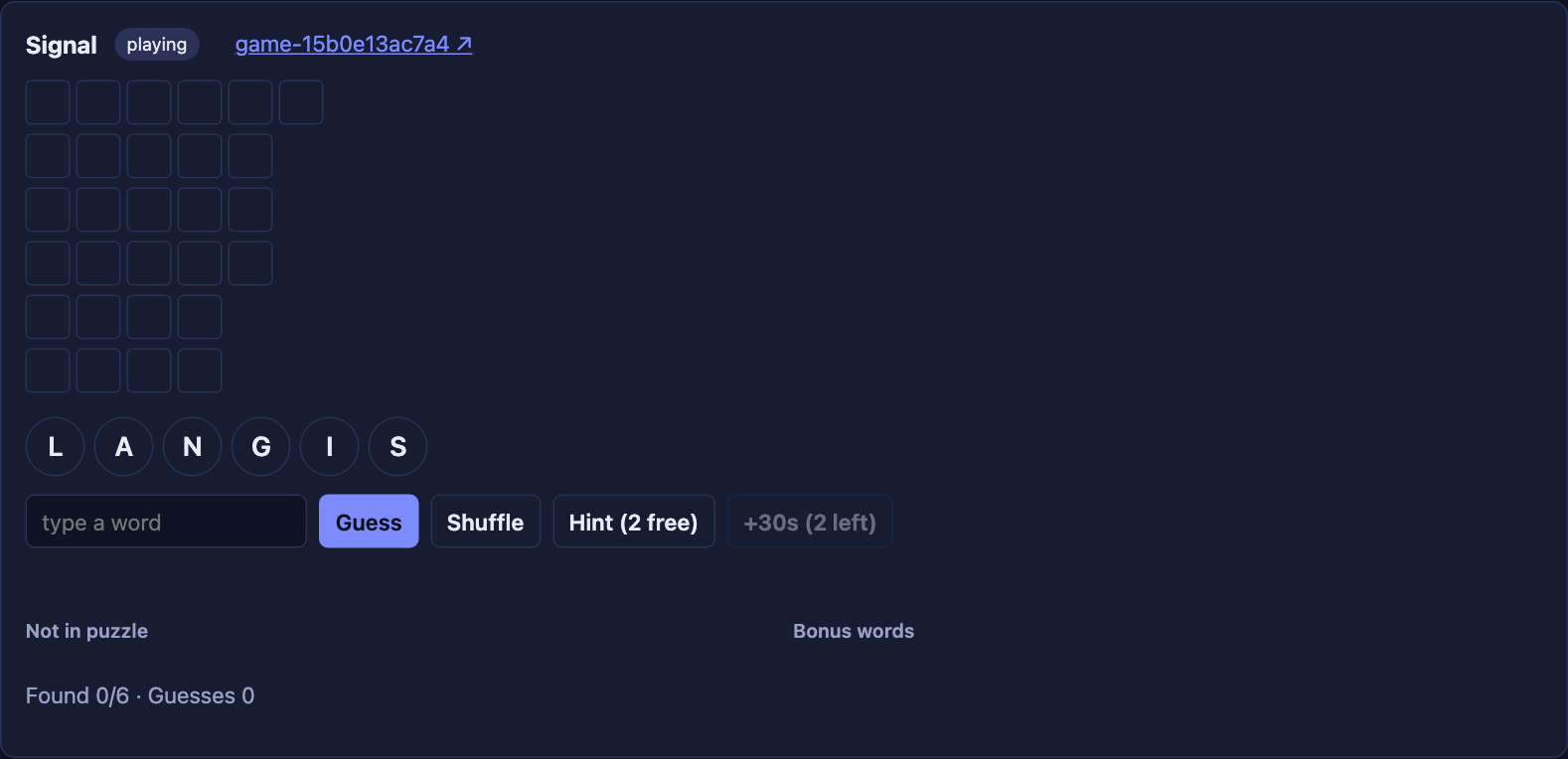
Click a puzzle. The board appears: letters, and blank slots for each word.
-
Try a guess. You see This arrives in Lesson 3.
-
Click Workflow ↗. The Temporal UI shows a
GameWorkflowwith status Completed. -
Its Event History has five events:
WorkflowExecutionStarted, then a Workflow Task (scheduled, started, completed), thenWorkflowExecutionCompleted.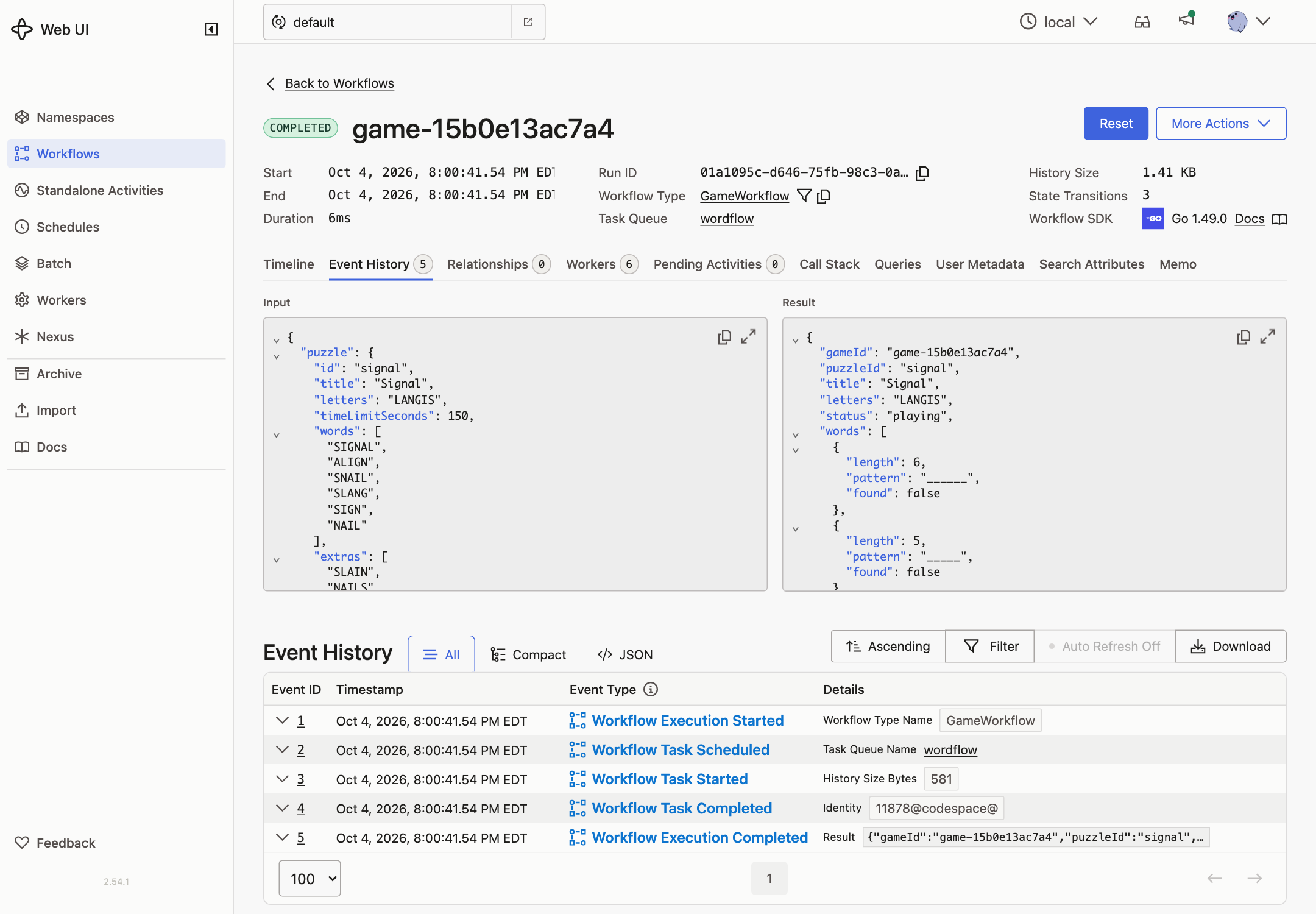
-
The Input contains the whole puzzle, answers included. Anyone who can read the history can see them. Lesson 2 fixes that.
-
Stop the Worker and click a puzzle. After 15 seconds the app shows a timeout. In the Temporal UI the new Workflow is Running and waiting for a Worker. Start the Worker again and it completes right away.
The last check is the core idea: Temporal holds the work until a Worker is available to do it.