Optional Query Params via Dynamic SQL
Table of contents:
- Overview
- API Specification
- Implementation
- Building Dynamic Parameterized SQL
- Bonus Round - Making it Reusable
- Wrap Up
Overview
What you need:
- Anypoint Studio.
- Anypoint Platform Account - sign up for a trial
What you will build
We will be utilizing a MySQL database in order to build a Product System API, which we will publish to Exchange in order to utilize scaffolding; given that the focus of this article is query parameters, we will only be implementing the GET operation on the /products endpoint.
API Specification
- Log into https://anypoint.mulesoft.com.
- Navigate to design center
- Click
+ Create Newand selectNew API Spec - Give the API a title;
Product System API - In this case, our focus isn’t on designing the API itself, so choose to use
RAML 1.0rather than the visual editor. I will be providing you the starting RAML.
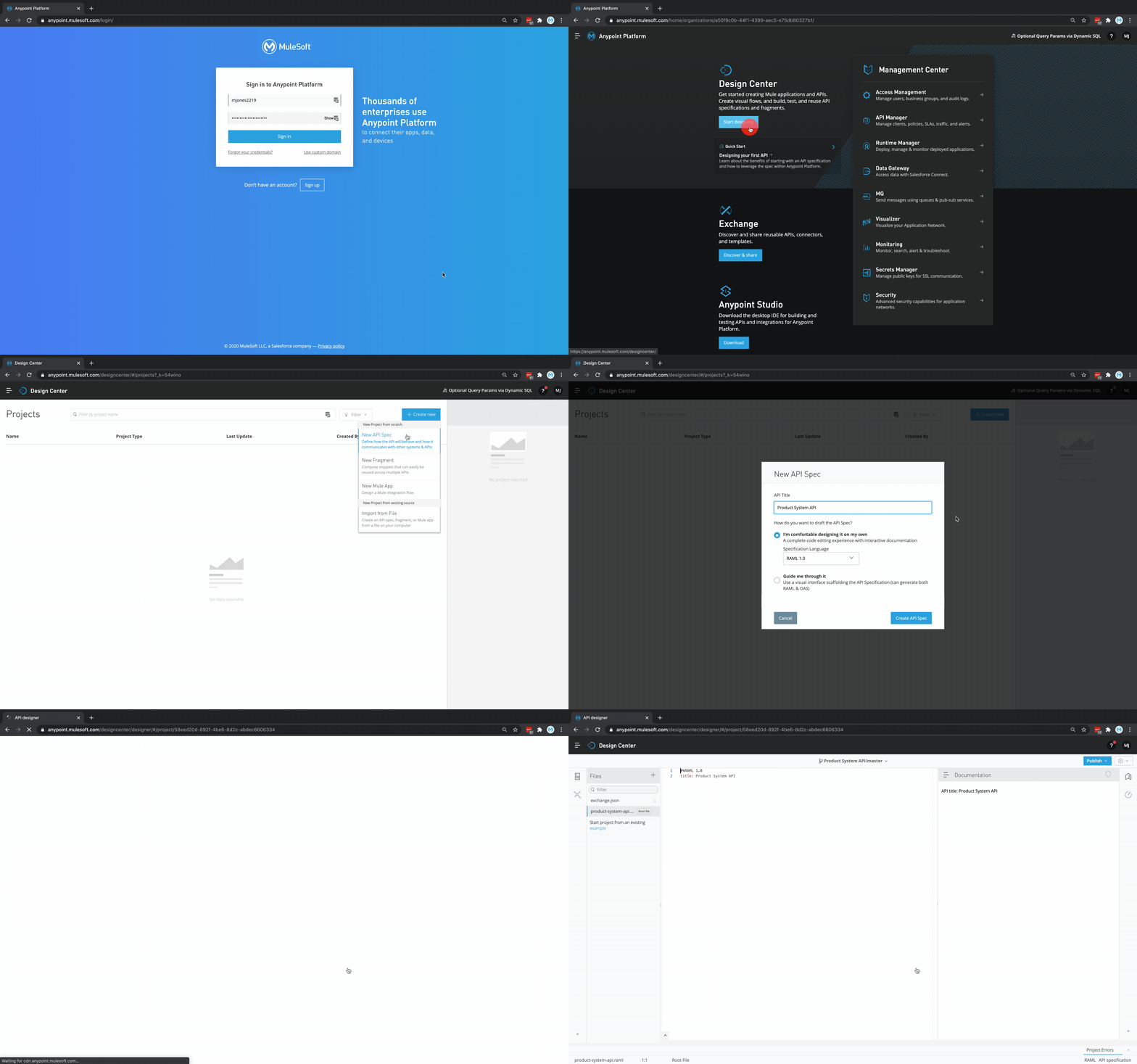
- Complete API specification. To start, copy the code below into your specification.
#%RAML 1.0
title: Product System API

types:
  Product:
    type: object
    properties:
      id: number
      name: string
      description: string
      productCode: string
      manufactured: boolean
      colors: string[]
      categories: string[]
      stock: number
      safetyStockLevel: number
      standardCost: number
      listPrice: number
      size: string
      sizeUnitMeasure: string
      weight: number
      weightUnitMeasureCode: string
      daysToManufacture: number
      images: string[]
      modifiedDate: date-only
      createdDate: date-only

/products:
  get:
    description: Returns a list of Products
    responses:
      200:
        body:
          application/json:
            type: Product[]
This gives us our basic API which returns a list of products, but it would be nice to be able to filter things! Our products have a field called weightUnitMeasureCode, and it would be very useful to be able to filter by this code. A simple implementation might look like:
...
  queryParameters:
    weightUnitMeasureCode:
      type: string
      required: false
The disadvantage here though is we can only filter by a single weightUnitMeasureCode! It would be nice to be able to specify multiple, ie: ?weightUnitMeasureCode=lb&weightUnitMeasureCode=oz. Thankfully, query parameters can be specified as repeatable. Lets go ahead and add this to our spec now:
/products: // L28
  get:
    description: Returns a list of Products
+     queryParameters:
+       weightUnitMeasureCode:
+         type: string[]
+         required: false
    responses:
      200:
        body:
          application/json:
            type: Product[]
Another prime candidate for a query parameter is the field manufactured. By default, we won’t be filtering any products, so lets go ahead and add it as an optional field:
    queryParameters: // L31
      weightUnitMeasureCode:
        type: string[]
        required: false
+       manufactured:
+         type: boolean
+ required: false- Publish to exchange - now that we’ve finished the spec we’re going to use, click
Publishin the top right and thenPublish to Exchange. Set the asset version to1.0.0and API version tov1. - Your published API specification should look like this.
Implementation
Now that we’ve built our API specification, we can open studio and scaffold our API and provide implementation logic.
Create Project
- Open Anypoint Studio
- Create a new project called ‘Product System API’
- Click the
+button to add an API from exchange to the project. - Sign into your platform account and search for ‘Product System API’
- Create project and scaffold
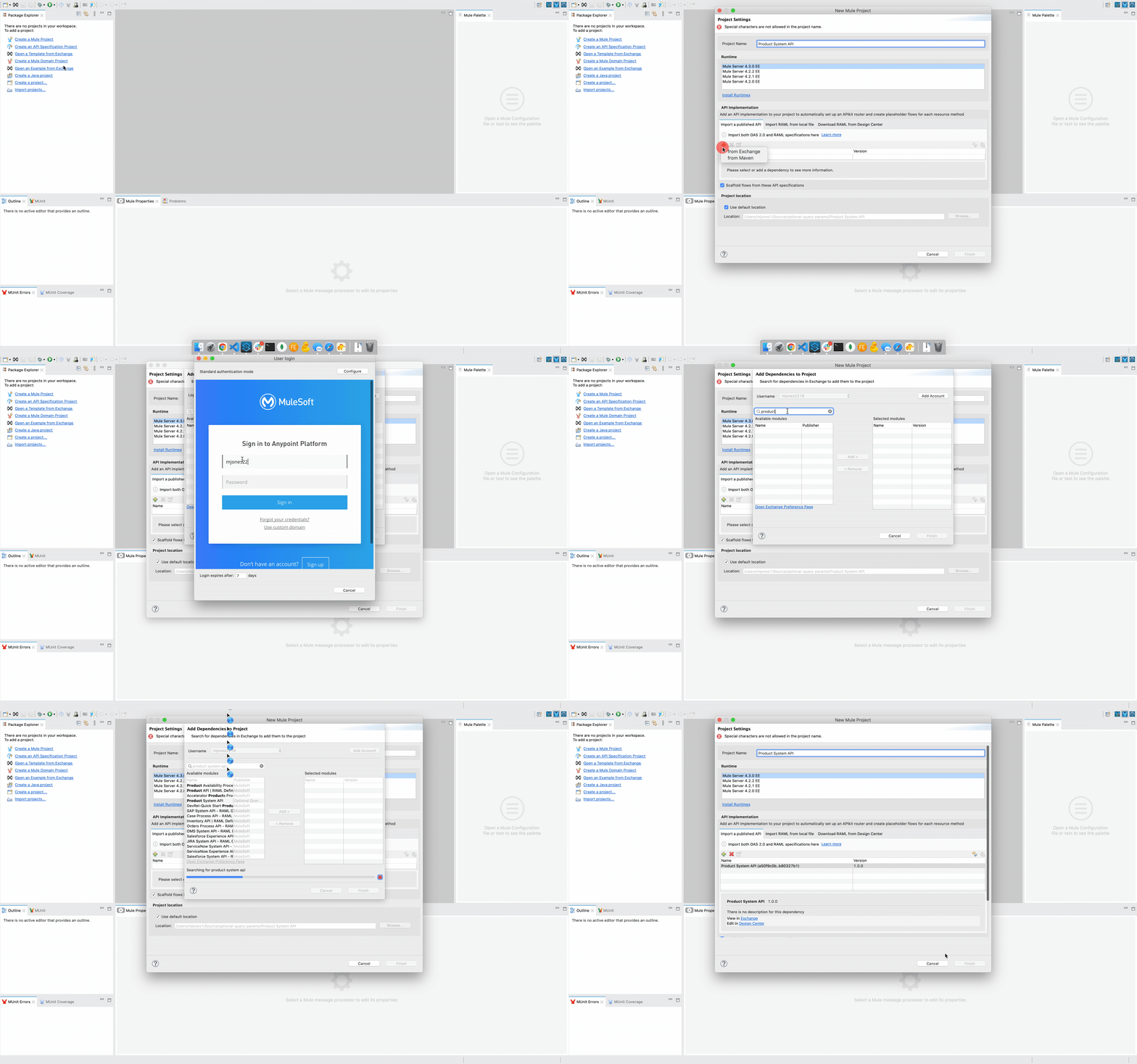
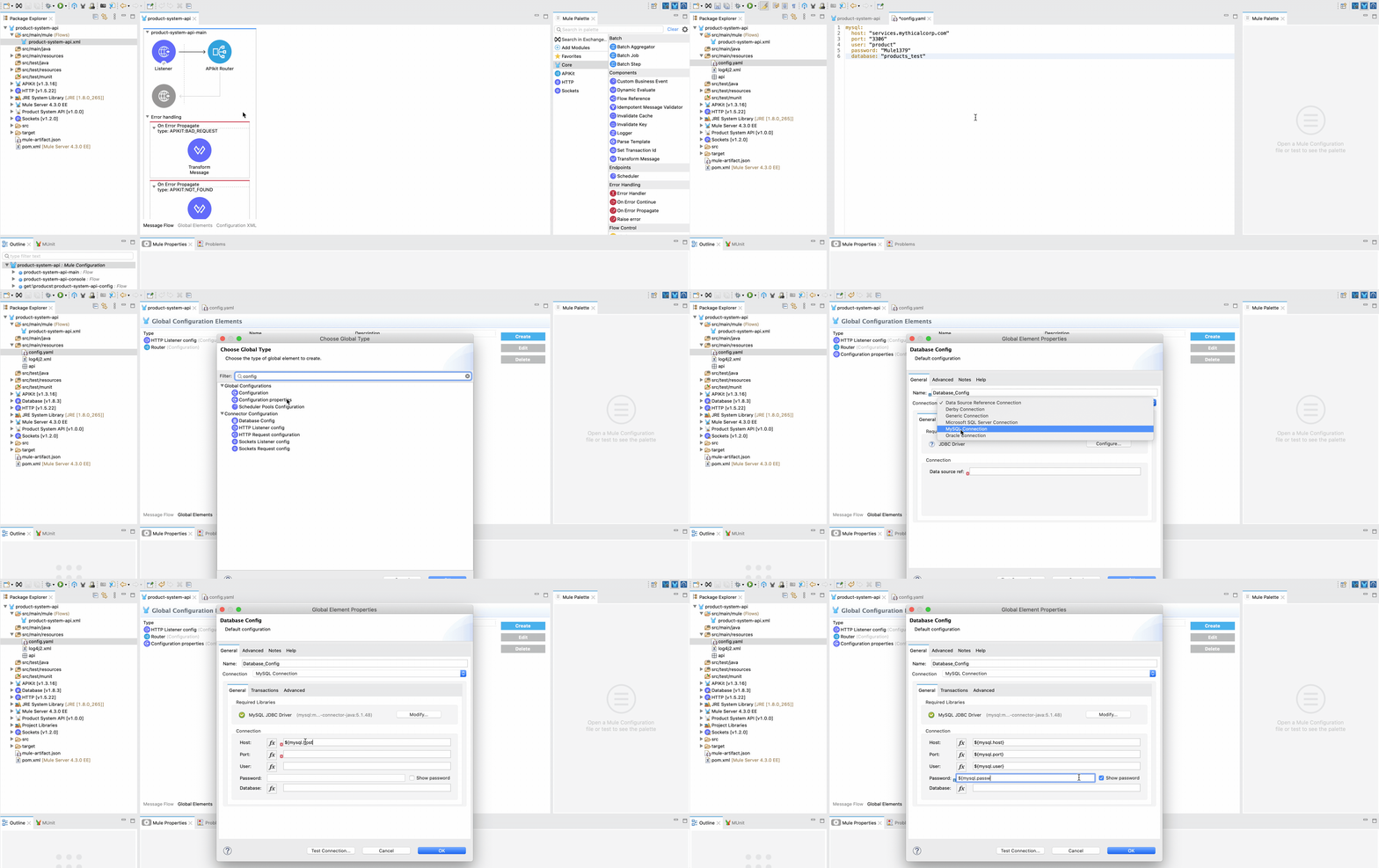
Setup MySQL Connection
- In
src/main/resources, create a new file called config.yaml - Copy the following code into config.yaml:
mysql:
  host: "services.mythicalcorp.com"
  port: "3306"
  user: "product"
  password: "Mule1379"
database: "products_test"- In the mule palette, click
Add Modules, and drag theDatabaseconnector into the blue box. - Click on the
Global Elementstab - Click
Createand search forconfig. SelectConfiguration properties - Type
config.yamlin for the file. - Click
Createand search fordatabase. SelectDatabase config - In the connection dropdown, select
MySQL Connection - Under required libraries, click
Configureand then clickAdd recommended libraries - Fill in the following fields:
- Host:
${mysql.host} - Port:
${mysql.port} - User:
${mysql.user} - Password:
${mysql.password}(tip: Click on the show password checkbox) - Database:
${mysql.database}
- Host:
- Click on
Test connectionto verify connectivity.
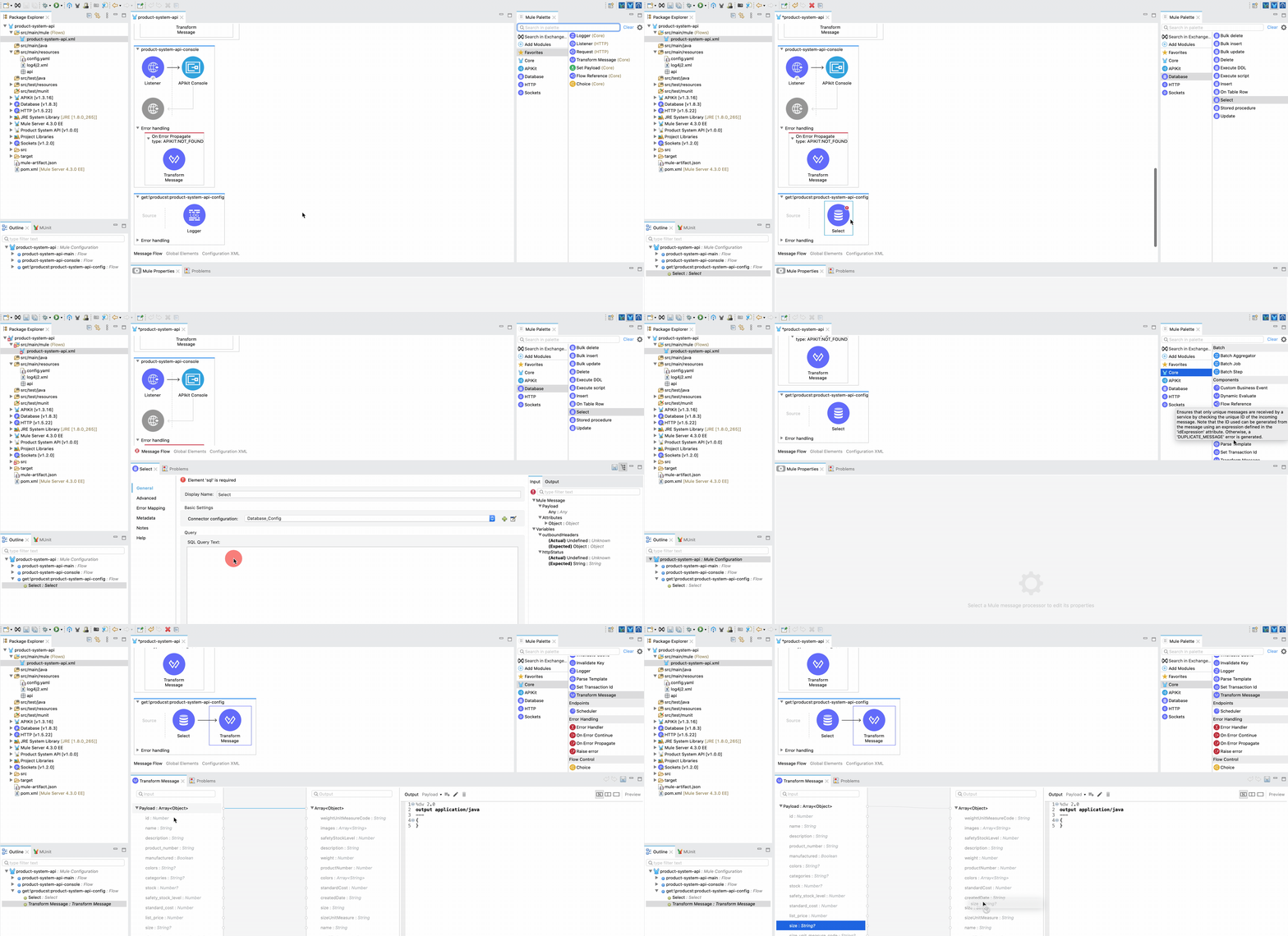
Create Basic Select and Map Data
Now that we have our connectivity setup, we can create the basic implementation of our endpoint: select everything and map to our canonical data model.
- Find the flow
get:\producst:product-system-api-configand delete the components - In the mule palette, select
Databaseand drag aSelectoperation into the flow - Select
Database_Configin theConnector configurationdropdown - Paste the following SQL into
SQL Query Text(don’t worry, we will walk through converting this to be dynamic later)
SELECT
  p.id, p.name, p.description, p.product_number, p.manufactured, p.colors, p.categories, p.stock, p.safety_stock_level, p.standard_cost, p.list_price, p.size, p.size_unit_measure_code, p.weight, p.weight_unit_measure_code, p.days_to_manufacture, p.images,  p.modified_date, p.created_date
FROM
product p- In the mule palette, find a
Transform Messagecomponent and add it after ourSelectcomponent. We need to map our data to our canonical model defined in our spec. - The
Transform Messagecomponent should have automatically discovered the metadata; you can now drag and drop the fields to map. Go ahead and map a few fields to give it a try, and then replace the automatically generated data-weave with this code below:
%dw 2.0
output application/json
---
payload map ( payload01 , indexOfPayload01 ) -> {
  weightUnitMeasureCode: payload01.weight_unit_measure_code default "",
  images: (payload01.images default "") splitBy ",",
  safetyStockLevel: payload01.safety_stock_level,
  description: payload01.description,
  weight: payload01.weight default 0,
  productCode: payload01.product_number,
  colors: (payload01.colors default "") splitBy ",",
  standardCost: payload01.standard_cost,
  createdDate: payload01.created_date as String,
  size: payload01.size default "",
  sizeUnitMeasure: payload01.size_unit_measure_code default "",
  name: payload01.name,
  modifiedDate: payload01.modified_date as String default "",
  daysToManufacture: payload01.days_to_manufacture,
  id: payload01.id,
  categories: (payload01.categories default "") splitBy ",",
  stock: payload01.stock default 0,
  manufactured: payload01.manufactured,
  listPrice: payload01.list_price
}- Start the app, open the console, and test your api! You should be getting back all Products in the database without any filtering.
Building Dynamic Parameterized SQL
Implementing the optional manufactured query parameter will be our first path, as this will be the easiest.
In SQL, as in most languages, we can ‘short circuit’ our where clause and do something like this:
SELECT
  p.id, p.name, p.description, p.product_number, p.manufactured, p.colors, p.categories, p.stock, p.safety_stock_level, p.standard_cost, p.list_price, p.size, p.size_unit_measure_code, p.weight, p.weight_unit_measure_code, p.days_to_manufacture, p.images,  p.modified_date, p.created_date
FROM
  product p
WHERE
  (:manufactured IS NULL OR p.manufactured = :manufactured)
And then in the Input Parameters window, you can click the 𝑓x button and paste the following:
{
  manufactured:
    if (attributes.queryParams['manufactured']?)
      if (attributes.queryParams['manufactured']) 1
      else 0
    else null
}
By putting this data-weave in the Input Parameters fields, we are passing in parameterized values to our SQL. You should always take this approach when dealing with user input to protect against SQL injection. In our SQL, we are checking if the parameter is null first - if it is we are basically saying if (true === true), meaning don’t filter anything. We don’t need to check if attributes.queryParams.manufactured is actually a boolean; the scaffolding has already validated it. MySQL doesn’t support booleans and instead stores such information as a 1 or 0, so we have to convert the boolean to a 1 or 0 when parameterizing our value. Our logic is if the key exists, pass 1 for true 0 for false, otherwise pass null. Go ahead and run the API now and see how it does!
One query parameter down - but what about our repeatable parameter? In SQL we know we would do something like p.weight_unit_measure_code IN ('value1', 'value2'). What we can’t do is p.weight_unit_measure_code IN (:values); unfortunately, the JDBC driver isn’t going to understand an array. You might be tempted to write some data-weave which manually creates the list of values in the SQL (ie: IN ('lb', 'oz')), but the danger here is that we open ourselves to SQL injection. What do we need to do? Dynamically generate the parameter key names and the SQL.
Update your SQL block to contain the following; you must include the #[ at the beginning and the ] at the end as these convert the field value from static text to data-weave; I suggest using the copy code button.
#[
  output text/plain
  ---
  "
  SELECT
    p.id, p.name, p.description, p.product_number, p.manufactured, p.colors, p.categories, p.stock, p.safety_stock_level, p.standard_cost, p.list_price, p.size, p.size_unit_measure_code, p.weight, p.weight_unit_measure_code, p.days_to_manufacture, p.images,  p.modified_date, p.created_date
  FROM
    product p
  WHERE
    (:manufactured IS NULL OR p.manufactured = :manufactured)
  " ++ (
    if (attributes.queryParams.weightUnitMeasureCode?)
      " AND p.weight_unit_measure_code IN ($(
        attributes.queryParams.*weightUnitMeasureCode map ":weightUnitMeasureCode_$($$)" joinBy ","
      ))"
    else ""
  )
]
This looks confusing, and we’ll break it down later, but as an example if I made a GET request like ?weightUnitMeasureCode=lb&weightUnitMeasureCode=oz, the SQL we pass to the connector will be:
SELECT
    p.id, p.name, p.description, p.product_number, p.manufactured, p.colors, p.categories, p.stock, p.safety_stock_level, p.standard_cost, p.list_price, p.size, p.size_unit_measure_code, p.weight, p.weight_unit_measure_code, p.days_to_manufacture, p.images,  p.modified_date, p.created_date
  FROM
    product p
  WHERE
    (:manufactured IS NULL OR p.manufactured = :manufactured)
   AND p.weight_unit_measure_code IN (:weightUnitMeasureCode_0,:weightUnitMeasureCode_1)
Now we get a query string that is still parametrized, where each value gets its own indexed parameter key. In our example, we need our input parameters to look like this:
{
  "weightUnitMeasureCode_0": "lb",
  "weightUnitMeasureCode_1": "oz"
}
To produce a map like this, our Input Parameters data-weave is going to get a bit more complicated.
Paste the following data-weave into your Input Parameters field
var buildParameterMap = (weightUnitMeasureCodes) ->
    if (weightUnitMeasureCodes == null) {}
    else (weightUnitMeasureCodes reduce ((val,accum={}) ->
        {
            (accum - "index"),
            ('weightUnitMeasureCode_$(accum.index default 0)'): val,
            index: (accum.index default 0) + 1
        }
    )) - "index"
---
{
  manufactured:
    if (attributes.queryParams['manufactured']?)
      if (attributes.queryParams['manufactured']) 1
      else 0
    else null
}
++ buildParameterMap(attributes.queryParams.*weightUnitMeasureCode)
Start up the API and give it a test via the API Kit Console located at http://localhost:8081/console/. You should now be able to filter by multiple weightUnitMeasureCode query parameters.
Our buildParameterMap function takes in the attributes.queryParams.*weightUnitMeasureCode and builds a new map structure, or returns an empty object if the query parameter wasn’t provided. If you’re unfamiliar with the .* selector, it exists to select values from a repeated key into a single array, typically used with XML; in this case, we’re using it to select the multiple query parameters. In the query itself, which we’ve converted to data-weave with our #[ ], we are only including the WHERE clause itself if the query parameter was provided.
Bonus Round - Making it Reusable
This was a lot of work for something that, frankly, isn’t all that complicated. So to make things easier for ourselves, we can start building a reusable data-weave library.
As a starting point, I’ve built a few common functions and bundled them into the module dw::sql
%dw 2.0

fun SELECT(keys) =
keys match {
    case is String -> "SELECT $(keys)"
    case is Array<StringCoerceable> -> "SELECT $((keys default []) joinBy ', ')"
}

fun FROM(query: String, tableName: String) =
"$(query) FROM $(tableName default '')"

fun WHERE(query: String, where: String) =
if (isEmpty(where)) query
else "$(query) WHERE $(where)"

fun EQ(keyName: String, value: Any) =
if (value == null) ""
else "$(keyName) = :$(keyName)"

fun IN(keyName: String, values, wrapIn: String = "", separateWith: String = ", ") =
if (sizeOf(values default []) == 0) ""
else "$(keyName) IN (" ++ ((values default []) map "$(wrapIn):$(keyName)_$($$)$(wrapIn)" joinBy separateWith) ++ ")"

fun OR(left: String, right: String) =
ANDOR(left, right, false)

fun AND(left: String, right: String) =
ANDOR(left, right, true)

fun LIMIT(query: String, limit) =
if (limit == null) ""
else "$(query) LIMIT $(limit)"

fun OFFSET(query: String, offset) =
if (offset == null) ""
else "$(query) OFFSET $(offset)"

fun MySQL_BOOL(val) =
if (val == null) null
else (
if (val) 1
else 0
)

fun PARAMS_EQ(keyName: String, value: Any) =
if (value == null) {}
else { (keyName): value }

fun PARAMS_IN(keyName: String, values, wrapIn: String = "") =
if (sizeOf(values default []) == 0) {}
else (values reduce (val, res={}) ->
    res - "index" ++ {
        "$(keyName)_$(res.index default 0)": val
    } ++ {
        index: (res.index default 0) + 1
    }) - "index"

fun ANDOR(left: String, right: String, requireBoth: Boolean) =
if (isEmpty(left)) right
else if (isEmpty(right)) left
else if ((right contains " AND ") or (right contains " OR ")) "$(left) $(if(requireBoth) 'AND' else 'OR') ($(right))"
else "$(left) $((if (requireBoth) 'AND' else 'OR')) $(right)"
This now lets us convert our SQL Query Text to this far more succinct script:
#[
  import * from dw::sql
  output text/plain
  ---
  SELECT([
    'id', 'name', 'description', 'product_number', 'manufactured',
    'colors', 'categories', 'stock', 'safety_stock_level',
    'standard_cost', 'list_price', 'size', 'size_unit_measure_code',
    'weight', 'weight_unit_measure_code', 'images', 'modified_date',
    'created_date'
  ])
  FROM('product')
  WHERE(
    EQ('manufactured', MySQL_BOOL(attributes.queryParams['manufactured']))
    AND
    IN('weight_unit_measure_code', attributes.queryParams.*weightUnitMeasureCode)
  )
]
And our input parameters to:
import * from dw::sql
---
{
  (PARAMS_EQ('manufactured', MySQL_BOOL(attributes.queryParams['manufactured']))),
  (PARAMS_IN('weight_unit_measure_code', attributes.queryParams.*weightUnitMeasureCode))
}
Wrap Up
By taking these functions and building a reusable library that handles the logic for us, we make our lives much easier the next time around!
If you have any questions or issues, feel free to click the button at the top of the page and submit a post question!